

Museum Records Software: What to Look For and How Blueputto Fits
Museum records software for collections, archives, and documentation. See what to look for in a system and how Blueputto keeps records structured and searchable.
 Grzegorz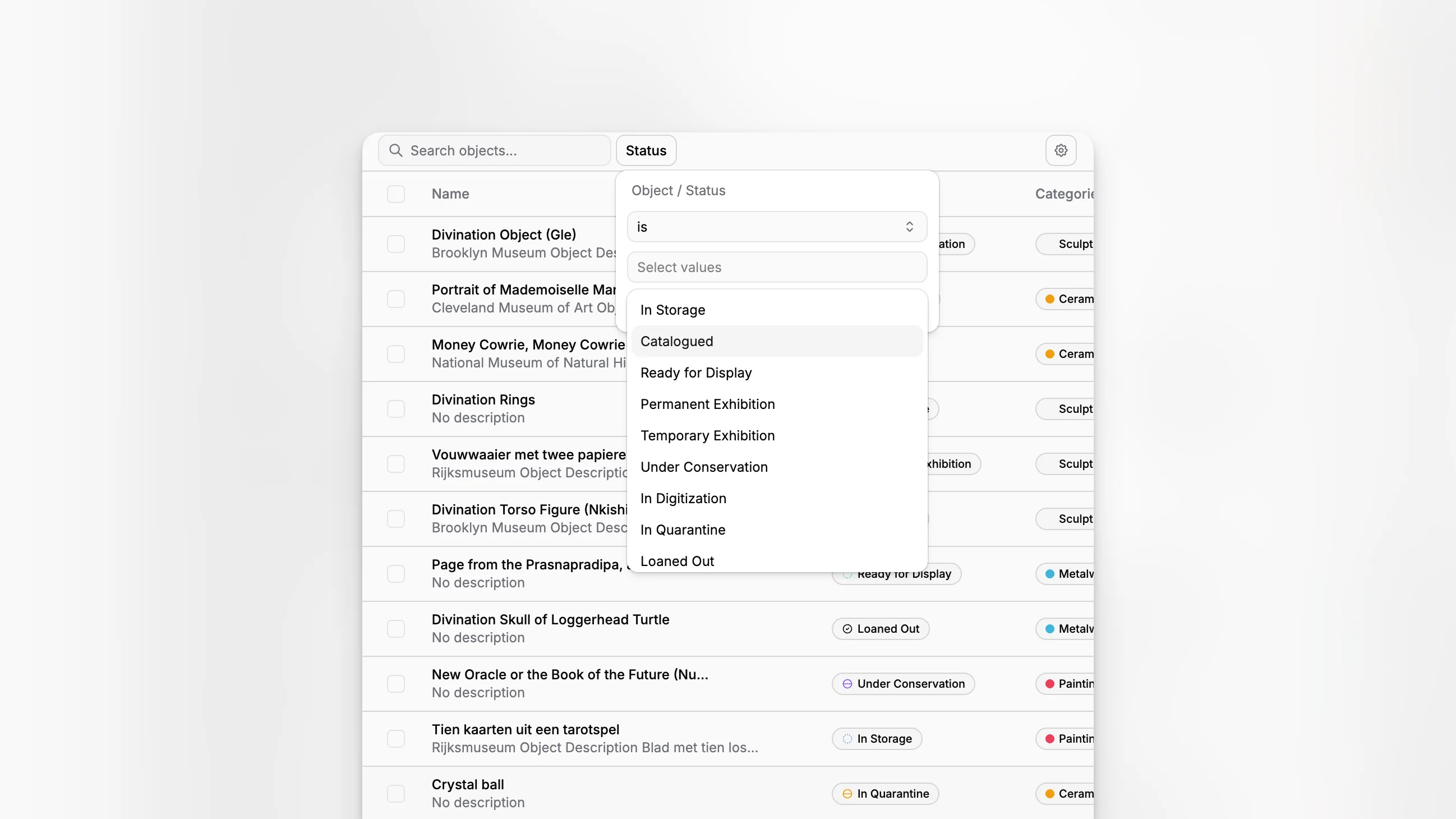
Museum records software sits at the point where collections accountability, archival control, and day-to-day staff work all meet. A museum may have a separate collections policy, registrar workflow, archive, and internal documentation process, but the records themselves still need one reliable place to be organized, searchable, and maintained over time. That is the practical problem this category of software is meant to solve, and it is exactly where Blueputto is positioned as museum management software for collections, archives, records, and documentation.
TL;DR: Museum records software should help your institution control object records, related documents, archival material, categories, statuses, and team workflows without turning recordkeeping into an IT project. Blueputto is best understood as a museum collections and documentation application built to keep records structured, scalable, and usable as collections and institutional data grow.
What is museum records software, really?
The term can be misleading because museums do not manage just one kind of record. There are accession records, catalog records, object files, condition and conservation documentation, loan paperwork, archive-related materials, internal documents, and the metadata that makes all of it findable. Professional guidance from the National Park Service Museum Handbook, Part II, the Smithsonian records management FAQ, and ICOM standards and guidelines all point to the same larger truth: museum recordkeeping is an operational discipline, not just a filing exercise.
That matters because many institutions still spread records across email attachments, shared drives, office documents, and legacy databases. The result is familiar. Staff can find the object, but not its supporting documentation. They can locate an image, but not the current record status. They know a folder exists somewhere, but not which version is authoritative.
Museum records software should reduce that fragmentation. In practice, that means the software must support structured records, attached documents, controlled organizational layers, and a usable method for managing growth. Blueputto’s public product and documentation pages describe a platform organized around items, documents, collections, folders, categories, statuses, labels, and templates, which is a strong clue about how the application approaches real museum documentation work.
Why do museums outgrow generic recordkeeping tools?
A basic document repository can store files. A general database can store fields. A project management app can assign tasks. None of those tools, on their own, reflects how museum records behave over years or decades.
Museum records keep changing. Catalog entries evolve as research improves. Documentation accumulates across acquisition, storage, exhibition, movement, treatment, and review. The NPS museum records guidance emphasizes procedures such as accessioning, cataloging, inventory, loans, deaccessioning, photography, and reporting. The Society of American Archivists museum archives guidelines similarly frame archives and records as ongoing institutional responsibilities, not static deposits.
Generic tools usually break down at three points:
they do not model relationships between collection records and documentation very well
they rely on inconsistent folder naming or ad hoc conventions
they become harder to search and govern as teams, records, and files multiply
This is where museum-specific software earns its place. Blueputto is not presented as a general office system. It is presented as museum management software and a digital archive environment designed to preserve collections, organize records, and streamline documentation. That category focus matters more than feature count alone.
What should good records software help a museum do every day?
The best way to judge the category is not by a marketing checklist. It is by routine work. If the software does not improve everyday recordkeeping, it will not improve governance either.
A practical museum records system should help staff:
create and maintain item-level records consistently
attach and retrieve related documents quickly
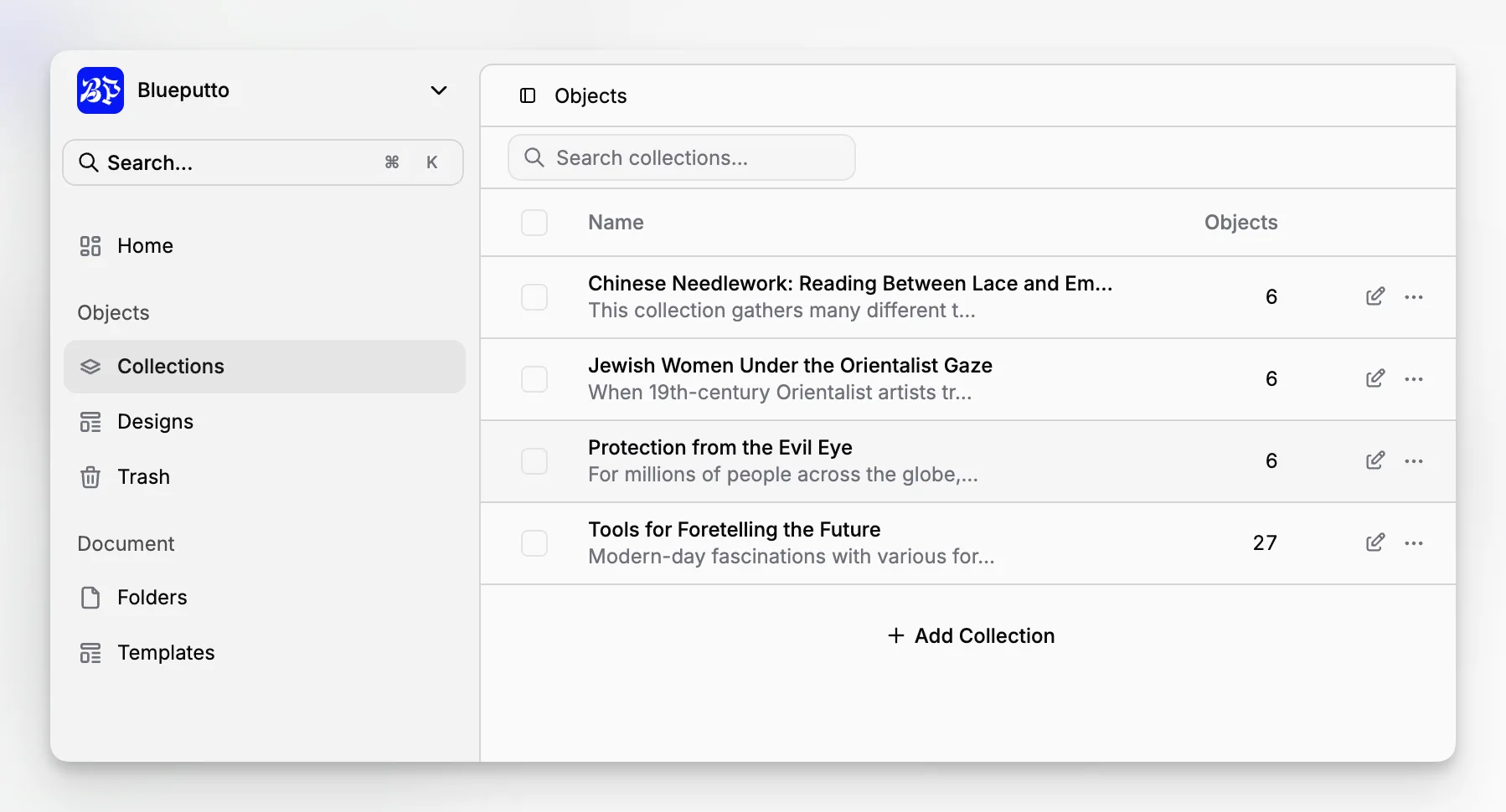
group records into logical collections
organize material in folders without losing metadata structure
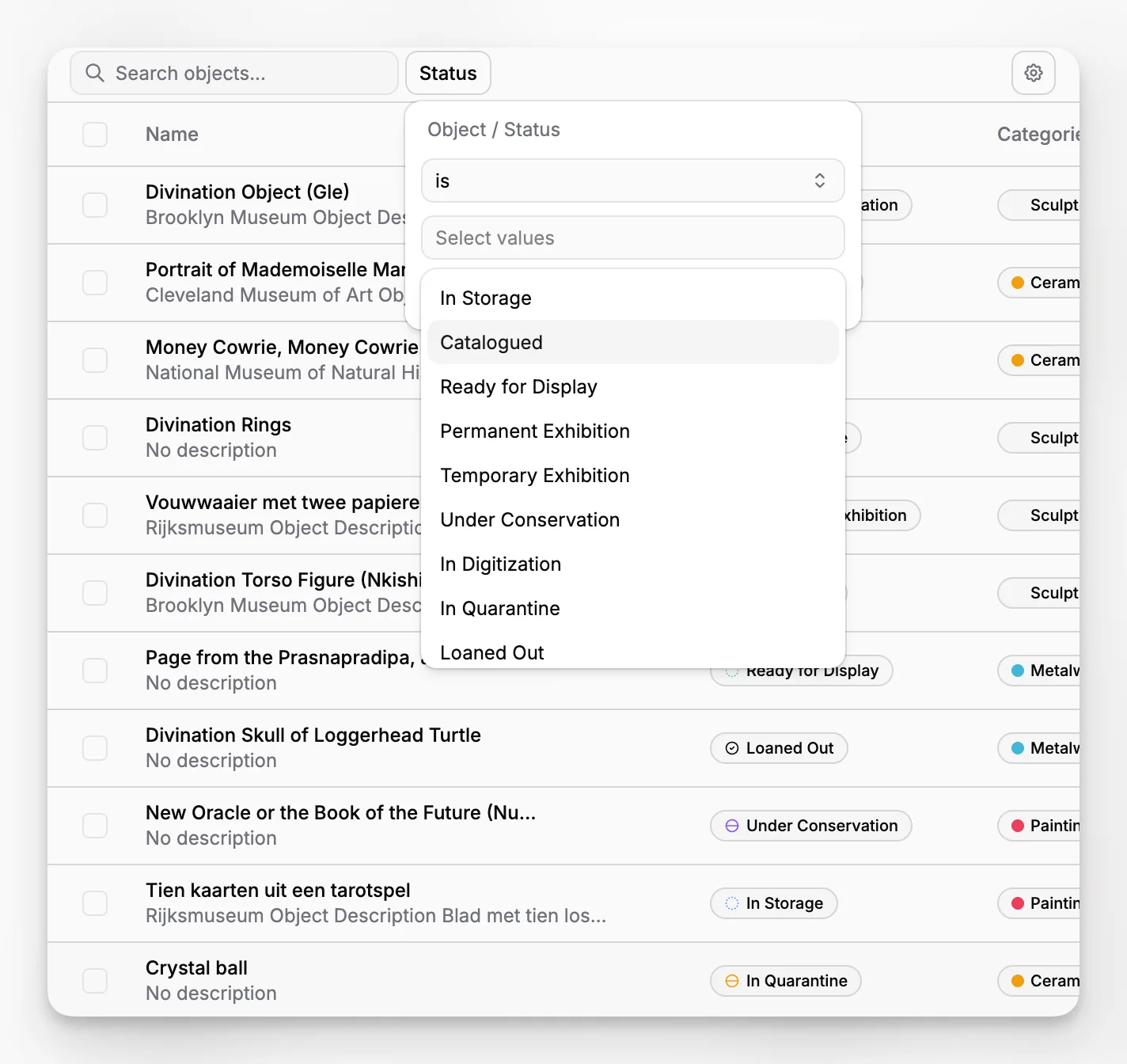
standardize terminology through categories, labels, and statuses
support repeatable documentation through templates
keep the system usable as data volume grows
Blueputto’s documentation structure strongly reflects those exact building blocks. The product exposes dedicated objects for items, documents, collections, folders, categories, statuses, labels, and document templates rather than hiding everything inside one undifferentiated repository. That is a meaningful signal for museums that want cleaner control over records from the start.
How does Blueputto map to real museum records workflows?
Blueputto makes the most sense when you think of it as a structured environment for managing the relationship between records and documentation, not just as a place to upload files.
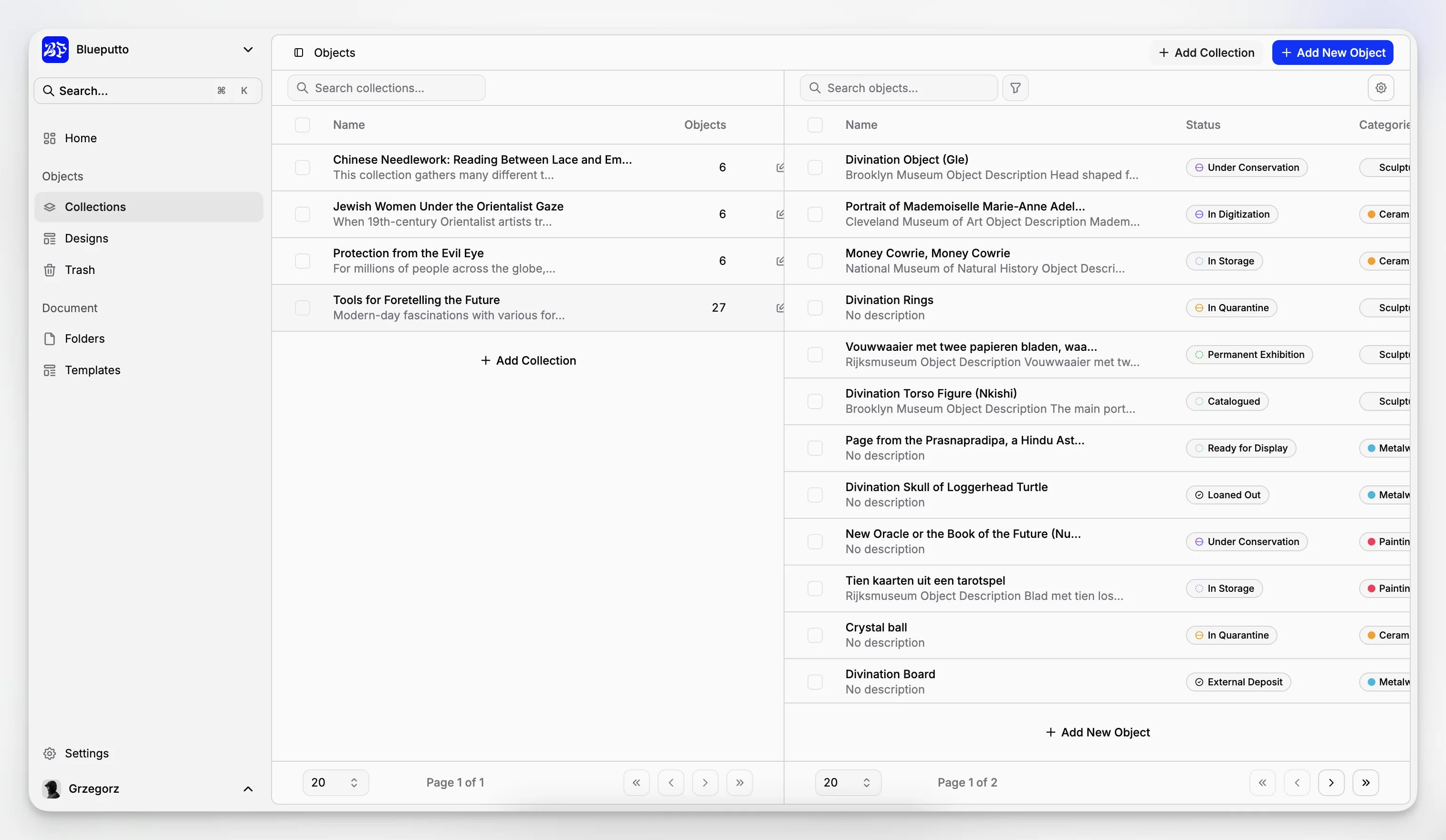
Items as the core record
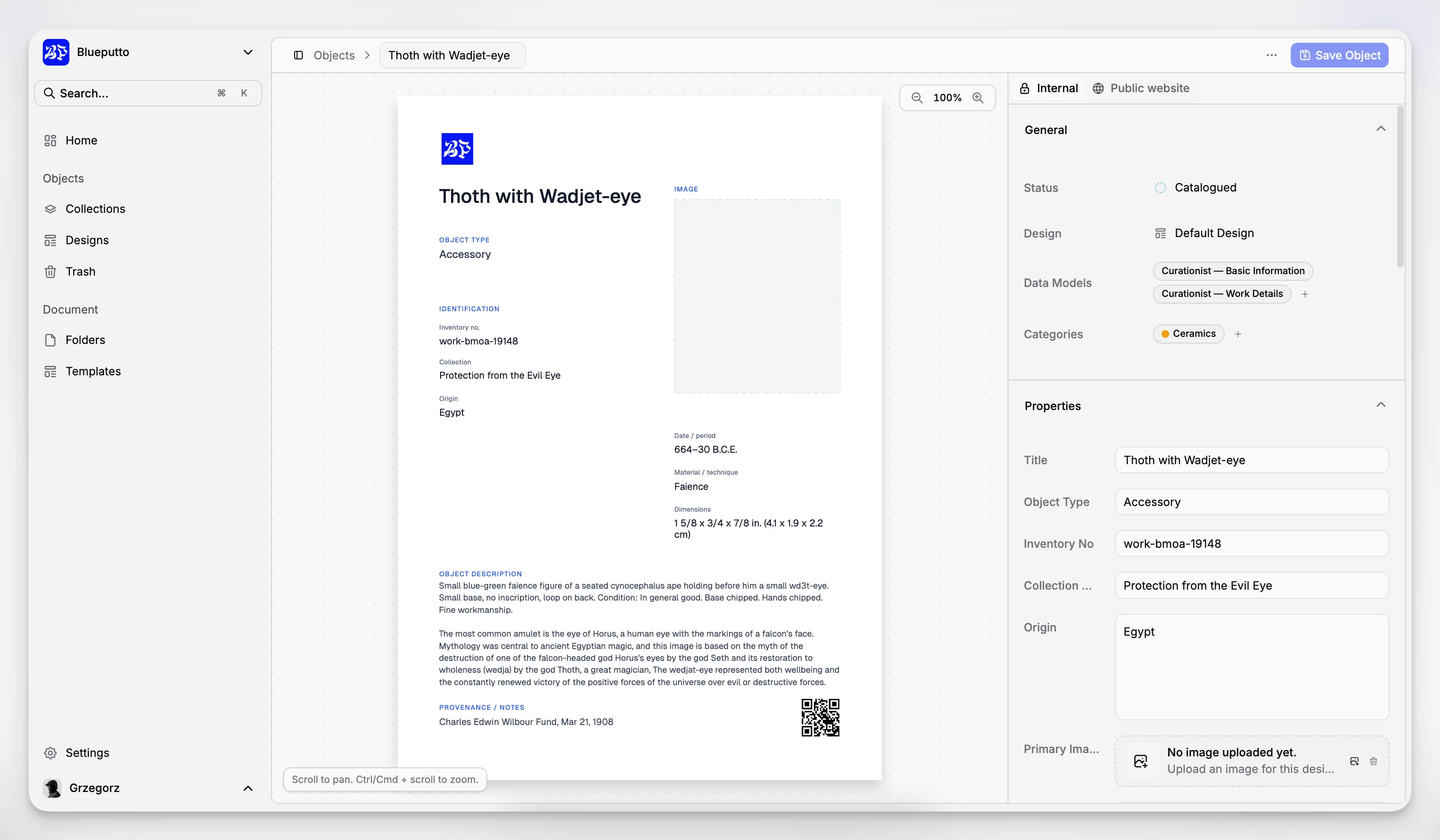
In museum work, the object or archival unit usually needs a persistent record. Blueputto’s item model suggests a clear anchor for that role. Instead of burying essential information in filenames or spreadsheets, staff can maintain item records that can be updated, searched, categorized, and associated with documentation.
That design suits common museum scenarios such as:
documenting accessioned objects
tracking archival materials as structured records
maintaining records for collection research or documentation review
consolidating object-related media and supporting files around a single record
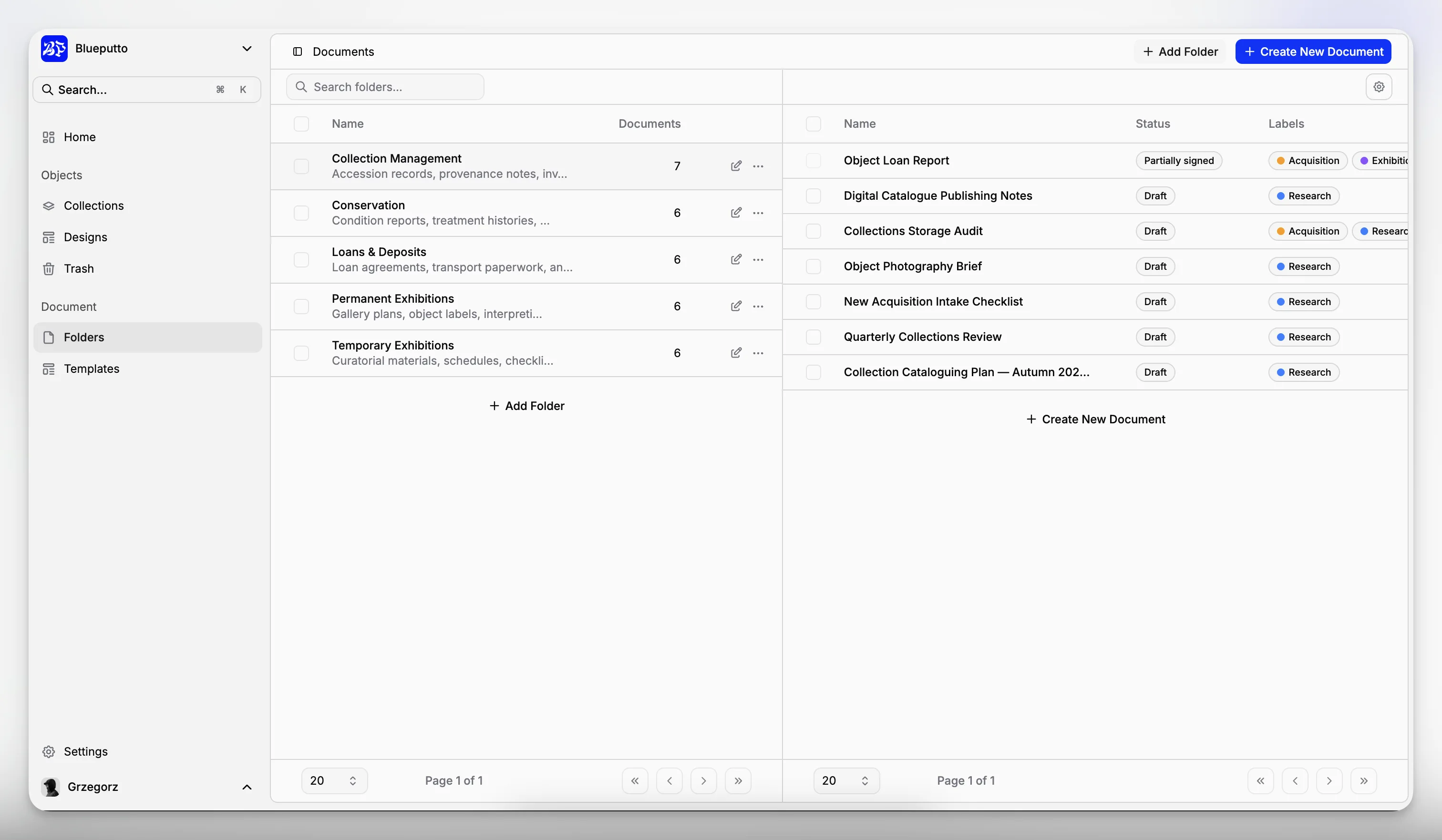
Documents as controlled supporting evidence
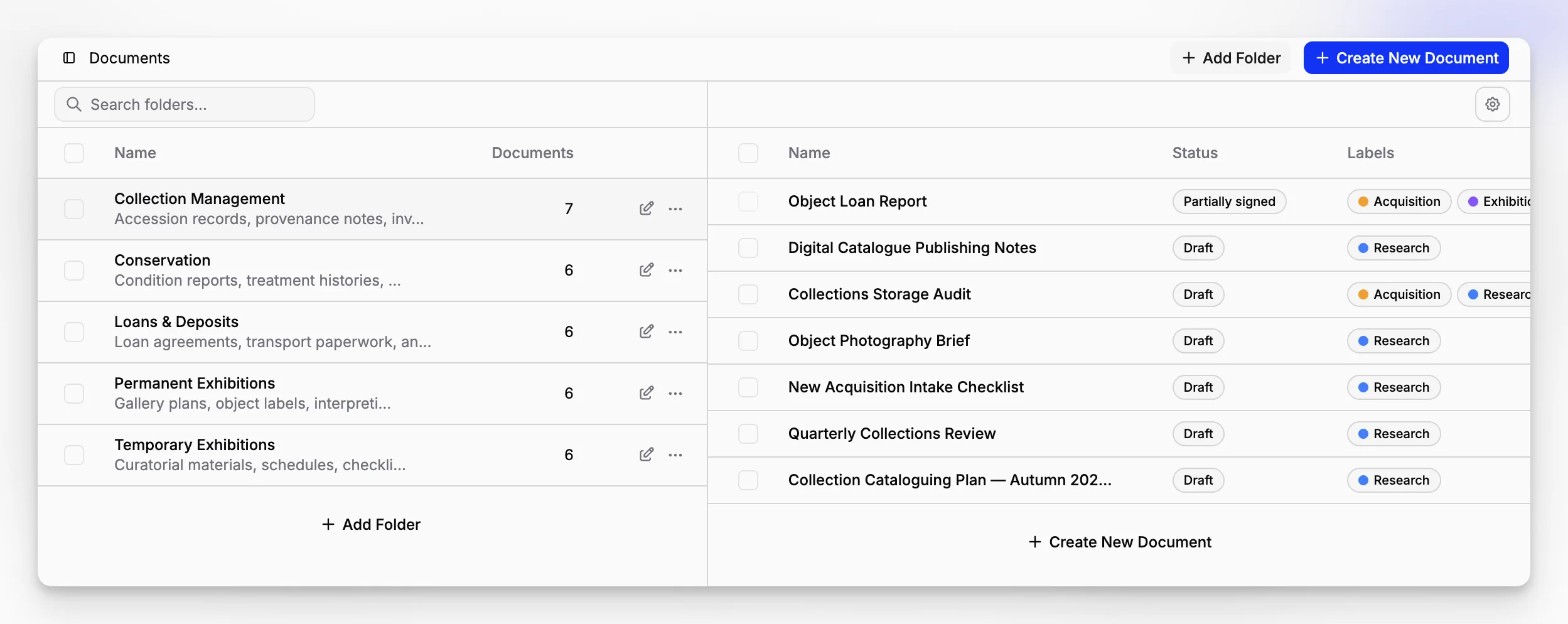
Museums rarely work with a single authoritative file per object. There may be incoming forms, reports, scans, reference materials, or internal records connected to the same item or collection. A dedicated document layer is valuable because it separates the record from the attachments while still keeping them connected.
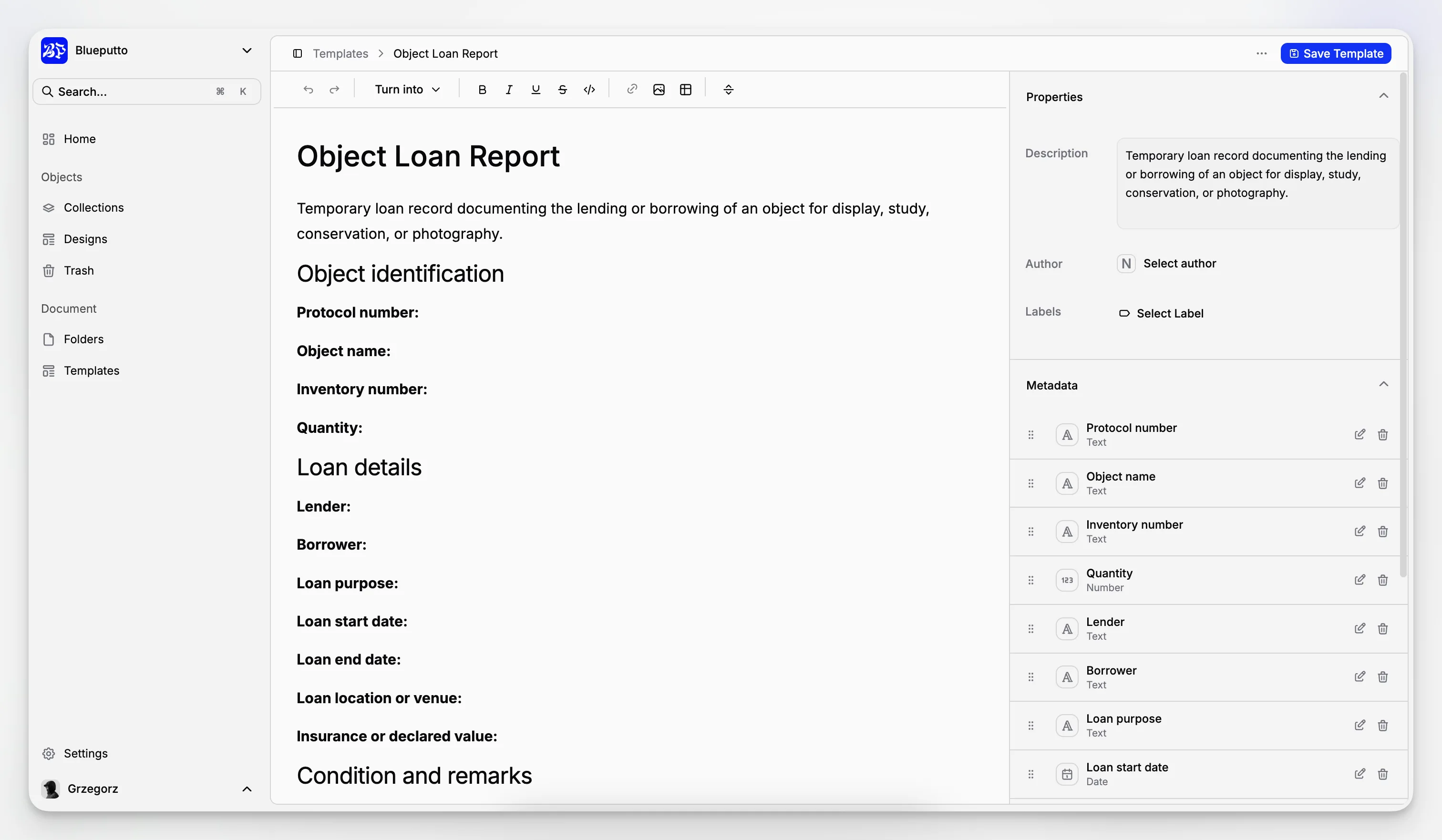
In Blueputto, documents and document templates indicate a workflow where supporting records are first-class objects, not an afterthought. That is useful for institutions that want consistency across recurring forms or documentation packets.
Collections and folders as organizational structure
A museum may need to organize records by collection, subcollection, department, project, donor group, or archive unit. Blueputto exposes both collections and folders, which suggests two different layers of control: one for grouping records conceptually and another for day-to-day arrangement.
That distinction is often underrated. A folder tree alone can become brittle and confusing. A collections layer alone can be too broad for operational work. Having both gives institutions more room to reflect how they actually manage records.
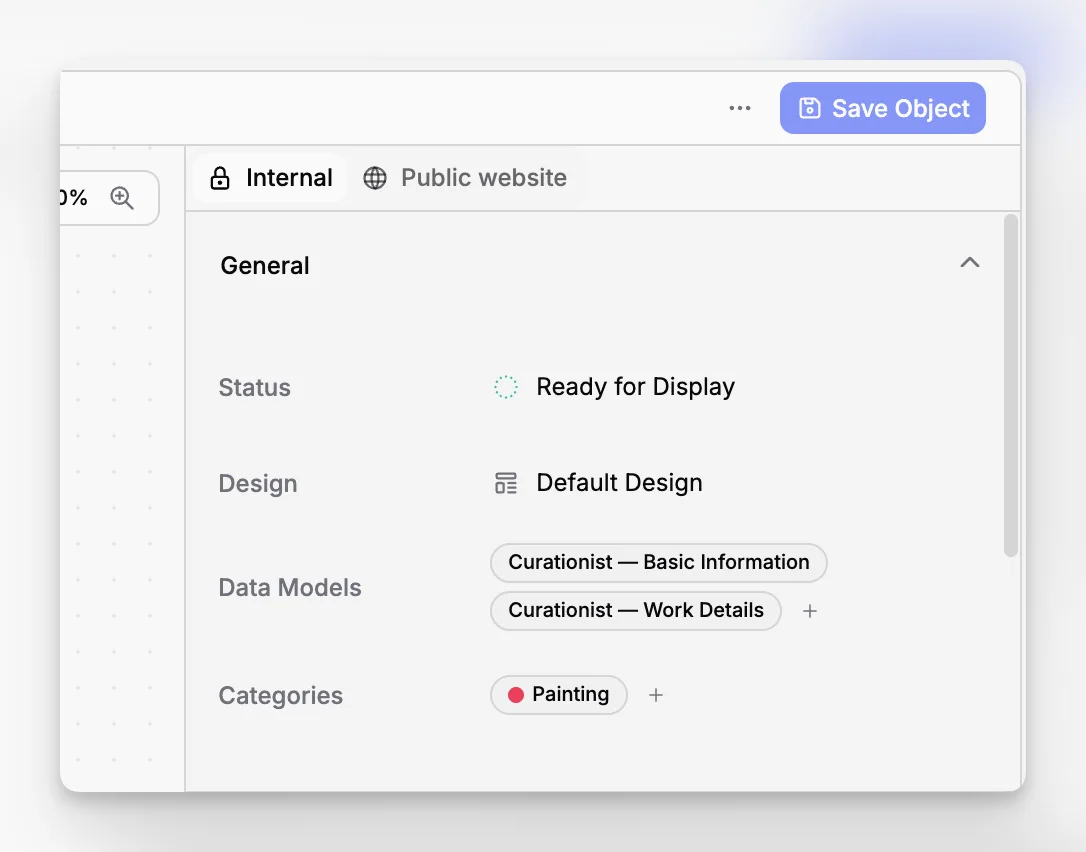
Categories, statuses, and labels as workflow discipline
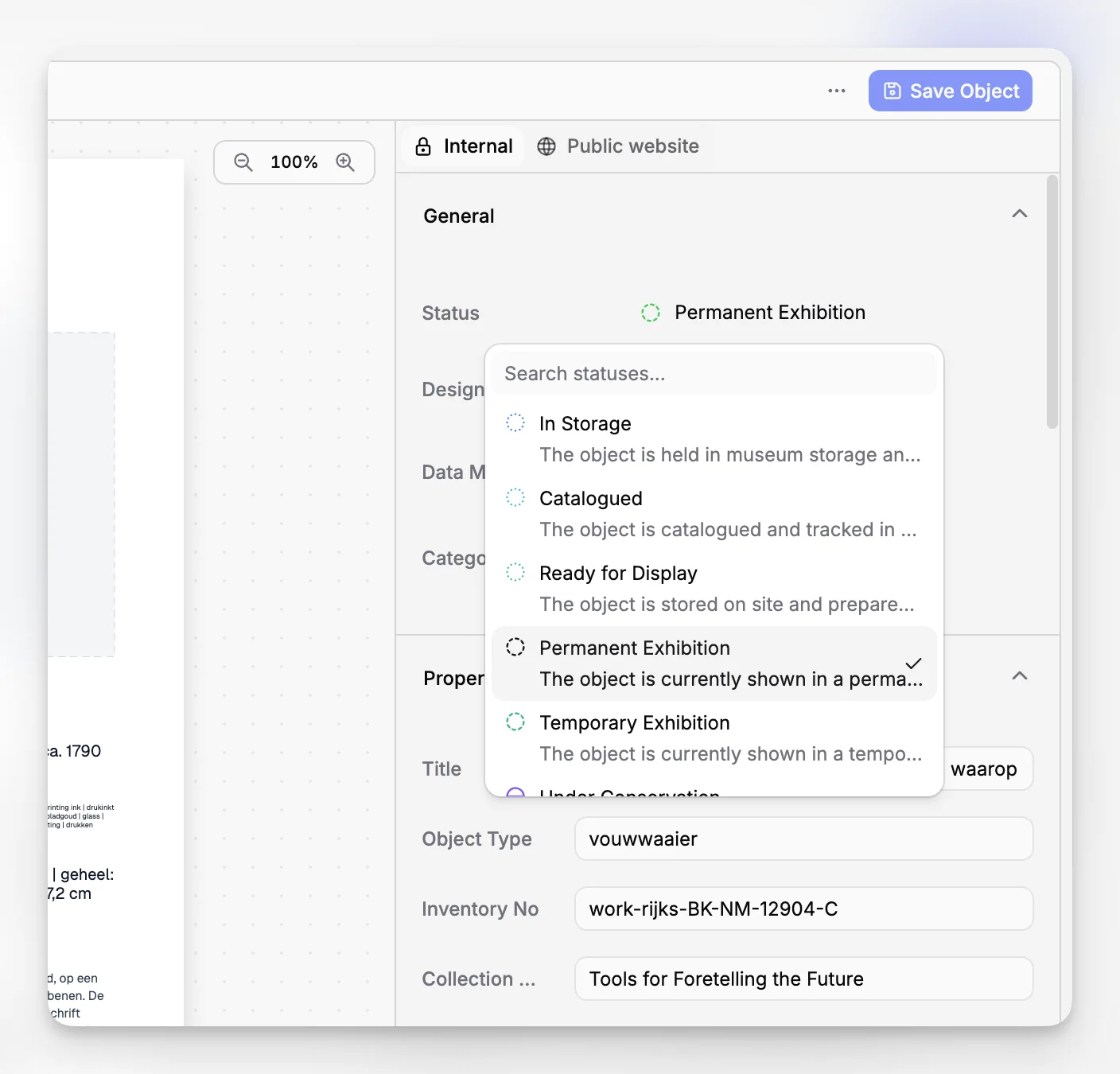
The most fragile part of museum recordkeeping is often not storage. It is consistency. If one registrar writes "pending review," another writes "to review," and a curator adds "awaiting check," the data quickly loses value. Controlled categories, statuses, and labels help prevent that drift.
The Smithsonian guidance on managing active records emphasizes file plans and customized policies. In software terms, Blueputto’s categories, labels, and statuses are the practical mechanisms that can translate those policies into everyday use.
What makes records software useful for collections, archives, and documentation at the same time?
Many institutions do not want three disconnected tools for collection objects, archival material, and internal documentation. They want one environment that can handle different kinds of records without flattening them into a single generic format.
That is one reason Blueputto’s category positioning is credible. Its own materials describe the product as museum management software for collections, archives, records, and documentation. Public documentation also points to a data model that can support multiple record types and organizational layers.
The practical advantage is not just convenience. It is context. If object records, archive-related documentation, and operational files live in the same system, staff are less likely to lose institutional memory in handoffs or siloed storage.
For example, a museum could use Blueputto to:
maintain an item record for an object or archival unit
group that record within a collection
store associated reports and scans as documents
apply categories for record type or department
use statuses to show readiness, review stage, or processing state
apply labels for cross-cutting retrieval needs
That is a more robust records practice than relying on nested drive folders and institutional memory.
How should a museum evaluate records software before adopting it?
A lot of software evaluations go wrong because institutions start with a wish list instead of a records audit. Before comparing vendors or tools, it helps to answer a few blunt questions:
What counts as a record in your institution?
Which records need structured metadata versus file storage only?
Where do staff currently duplicate effort?
Which terms, statuses, or classifications are inconsistent today?
Which record relationships are hardest to preserve over time?
What will happen when your collection size doubles?
The National Archives records basics and records management guidance are government-oriented, but the underlying lifecycle logic is still useful. Records are not just created. They are maintained, used, controlled, and eventually disposed of or preserved according to policy. Museums have their own frameworks, but the same lifecycle discipline applies.
When you test museum records software, look for evidence that the application can support this lifecycle without creating awkward workarounds. Blueputto’s published resource on scaling is relevant here because it explicitly speaks to growing collections, documentation, archives, users, and workflows.
Evaluation criteria that matter more than feature theater
A museum records platform is worth serious consideration when it can show strength in these areas:
Structured record model: Can you distinguish items, documents, collections, and organizational controls clearly?
Operational consistency: Can teams use categories, statuses, labels, and templates to reduce variation?
Scalability: Will the system still feel coherent after years of accumulation?
Searchability: Can staff find the right record without knowing which department created it?
Administrative clarity: Is the structure understandable enough to survive staff turnover?
Security and control: Are access patterns and data handling treated seriously?
Blueputto’s documentation and resources make a stronger case on structure and scalability than many superficial software pages do. Its security overview also matters because records and collection documentation often carry operational sensitivity, even when they are not public-facing.
Where does Blueputto appear strongest as records software?
Based on public product materials, Blueputto looks strongest in the area many museums actually struggle with most: giving structure to records and documentation before chaos sets in.
Its visible strengths include:
Clear separation of content types
The distinction between items, documents, collections, and folders is important. It suggests the software is designed to model different layers of museum information instead of forcing everything into one record type.
Controlled operational vocabulary
Categories, statuses, and labels are not glamorous, but they are where usable recordkeeping is won or lost. Institutions that care about consistent documentation usually need exactly these kinds of controls.
Repeatable documentation through templates
Document templates are especially relevant for museums that repeat intake, review, or reporting processes. A template does not solve policy questions on its own, but it does help turn policy into consistent practice.
Growth without forced replatforming
Blueputto’s own scaling documentation explicitly states that it is designed to support expanding collections, digital archives, institutional records, more users, more documentation, and evolving workflows. For museums planning beyond the next year, that is one of the more useful claims the company makes because it is tied to the core operational problem, not just vague growth language.
What are the tradeoffs and limitations to think about?
No records software should be treated as a magic fix. Even a well-structured application can disappoint if the institution brings weak governance into it.
Here are the main tradeoffs to keep in mind.
Software cannot replace policy
If your museum has no shared definition of what belongs in an object file, what statuses mean, or who approves changes, the application will only formalize that uncertainty. The Smithsonian records management pages and SAA museum archives guidance both reinforce that recordkeeping needs policy, not just storage.
More structure requires more decisions up front
A tool like Blueputto is appealing precisely because it offers structure. But structure asks something of the institution in return. You need to define categories, labels, folder logic, naming conventions, and template usage in a way staff can follow.
Not every team wants the same depth
A small volunteer-led museum and a large multi-site institution may both need records software, but not necessarily in the same way. The challenge is to adopt enough structure to improve control without making simple tasks feel bureaucratic.
Migration work is real
If your current records live across spreadsheets, drives, PDFs, and local conventions, moving into a structured platform will surface inconsistencies. That is not a software flaw. It is often the first honest view of the institution’s data quality.
What common mistakes do museums make when choosing records software?
The mistakes are usually predictable, which is helpful because they can be avoided.
Buying for one department only
A registrar may be the main stakeholder, but records usually touch curatorial staff, collections managers, archivists, conservators, and administrators. If the system only fits one group’s assumptions, adoption suffers.
Treating file storage as records management
A shared drive with deep folders is not the same as a records system. It may store evidence, but it rarely preserves relationships, status clarity, or consistent metadata.
Ignoring controlled terms
Museums often postpone work on categories, labels, and statuses because it feels administrative. In reality, these controls are what make retrieval, reporting, and cross-team understanding possible.
Over-customizing before basic practice exists
Institutions sometimes want a highly elaborate structure before staff can even agree on a minimum record standard. Start with the core fields, groupings, and workflow states you will actually use.
Choosing software that cannot grow with the collection
This is a major risk for small and mid-sized museums. A lightweight tool may seem cheaper or easier until records volume, staff count, or documentation complexity rises. Blueputto’s stated emphasis on long-term growth is relevant because museums do not stop accumulating information.
How can a museum implement Blueputto without creating extra chaos?
The cleanest implementation approach is usually phased. Do not begin by importing every historical file you can find. Begin by defining a workable records framework and applying it to active workflows.
A practical rollout might look like this:
define your core record types and what counts as an item
decide which supporting materials should be managed as documents
map your top-level collections and folder logic
standardize categories, statuses, and labels before broad data entry
create templates for recurring documentation
import or create active records first
expand into legacy material in controlled batches
Blueputto is better suited to this approach than a generic repository because its data model appears to encourage orderly structure from the beginning. Institutions interested in that route should review the product’s public features pages and documentation in detail before designing their internal conventions.
A sensible governance starter kit
Before launch, document a short internal standard covering:
how item titles are written
when a document is attached versus made into a separate record
which categories are mandatory
what each status means
when labels should be applied
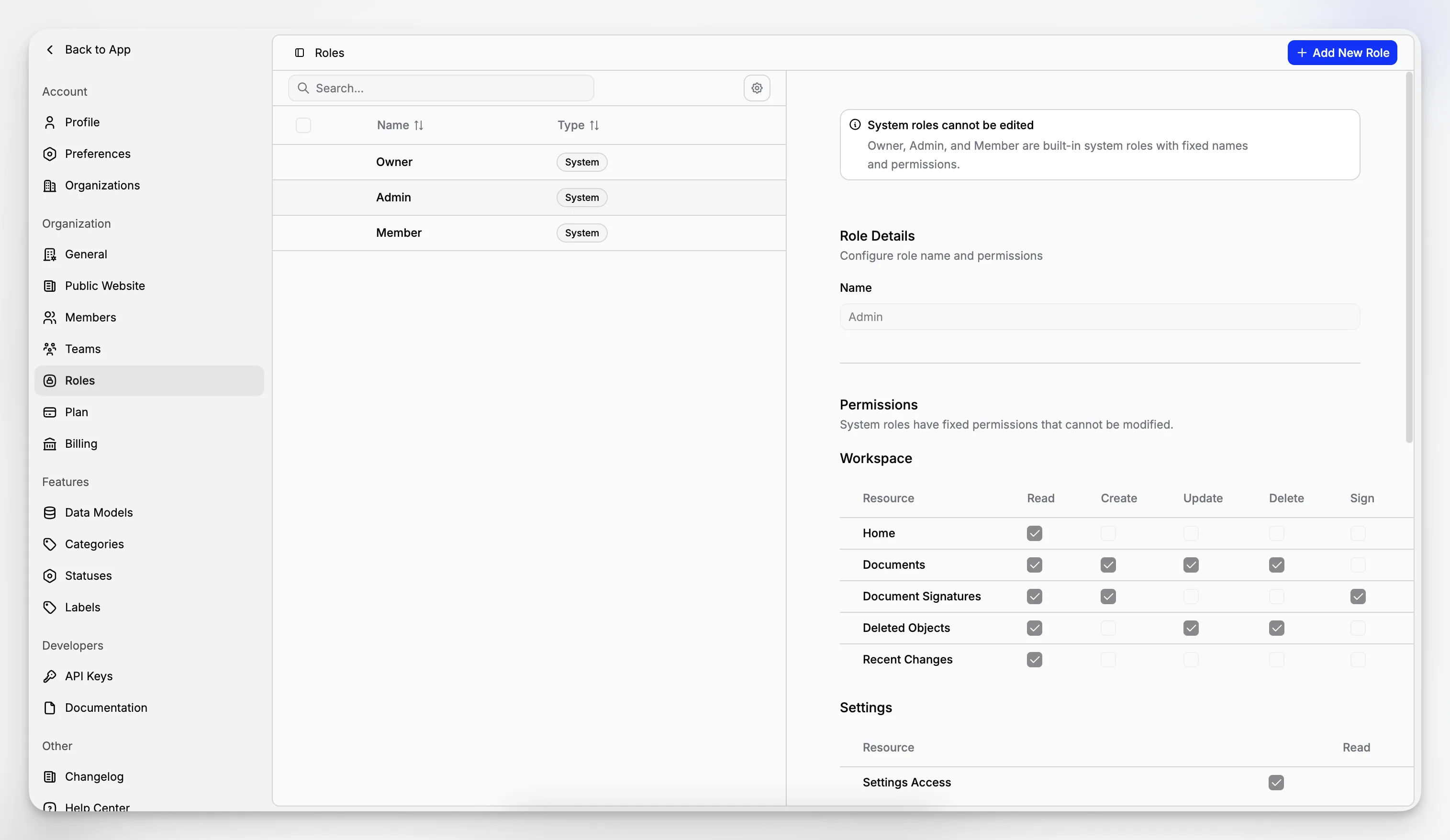
who can create templates
how collections and folders differ in your institution
Those decisions are not glamorous, but they are the difference between software that stays useful and software that turns into another archive of exceptions.
Is Blueputto a fit for every kind of museum records work?
It is better to answer this carefully than to overstate it. Based on public evidence, Blueputto is a credible fit for museums that need structured management of collections, archives, records, and documentation in one application. It appears especially well aligned with institutions that want cleaner control over item records and related documents as those records grow over time.
It may be particularly attractive if your current problems sound like these:
your records are spread between object files, PDFs, shared drives, and staff inboxes
the same documentation is saved in multiple places
staff cannot agree on status terms or naming conventions
you need a better way to keep item records and supporting documents connected
your collection and archive data are growing faster than your current system can handle comfortably
If those are your pain points, Blueputto’s structure is not abstract. It maps directly to the work. Its emphasis on items, documents, collections, folders, labels, categories, statuses, and templates reflects the real mechanics of museum recordkeeping better than many generic "document management" tools do.
What should a reader take away from the category as a whole?
Museum records software is not just about compliance, preservation, or search. It is about making institutional knowledge durable enough to survive time, growth, and staff turnover. The best systems support accountability while remaining usable in ordinary daily work.
That is why structure matters so much. The museum field has long emphasized documentation, accountability, access, and standards through bodies such as ICOM, the National Park Service, the Smithsonian Institution Archives, and the Society of American Archivists. Blueputto fits this conversation not by claiming to replace professional practice, but by giving that practice a practical software structure.
If your institution needs a records environment grounded in museum work rather than generic office logic, Blueputto deserves attention for the way it organizes the essentials. Not because it promises to solve every records challenge automatically, but because it appears designed around the right problem.
FAQ
What is museum records software used for?
It is used to organize and maintain the records that support museum collections and archives, including item records, documents, classifications, workflow states, and related documentation. The goal is to make records searchable, consistent, and usable over time instead of scattering them across drives, inboxes, and disconnected files.
How is records software different from simple document storage?
Document storage mainly holds files. Records software should also preserve structure, relationships, and workflow context. In a museum setting, that means linking item records with supporting documents, applying controlled categories and statuses, and making sure staff can retrieve the right record reliably as collections and documentation grow.
What does Blueputto do for museum recordkeeping?
Blueputto is positioned as museum management software for collections, archives, records, and documentation. Its public structure around items, documents, collections, folders, categories, statuses, labels, and templates suggests a practical system for organizing museum records in a more controlled and scalable way.
Can Blueputto support a growing museum collection?
Blueputto publicly states that it is designed to support expanding collections, archives, institutional records, users, and documentation workflows. That makes it relevant for museums that want a records platform that remains usable as data volume and operational complexity increase over time.
What should a museum define before implementing records software?
A museum should define what counts as a record, how item records differ from supporting documents, which categories and statuses will be used, how collections and folders are structured, and which workflows need templates. Software works best when those governance decisions are made clearly enough for staff to follow consistently.
