

Catalog Software for Museums in 2026
Catalog software for museums in 2026 should unify object records, documents, permissions, and public publishing in one scalable platform like Blueputto.
 Grzegorz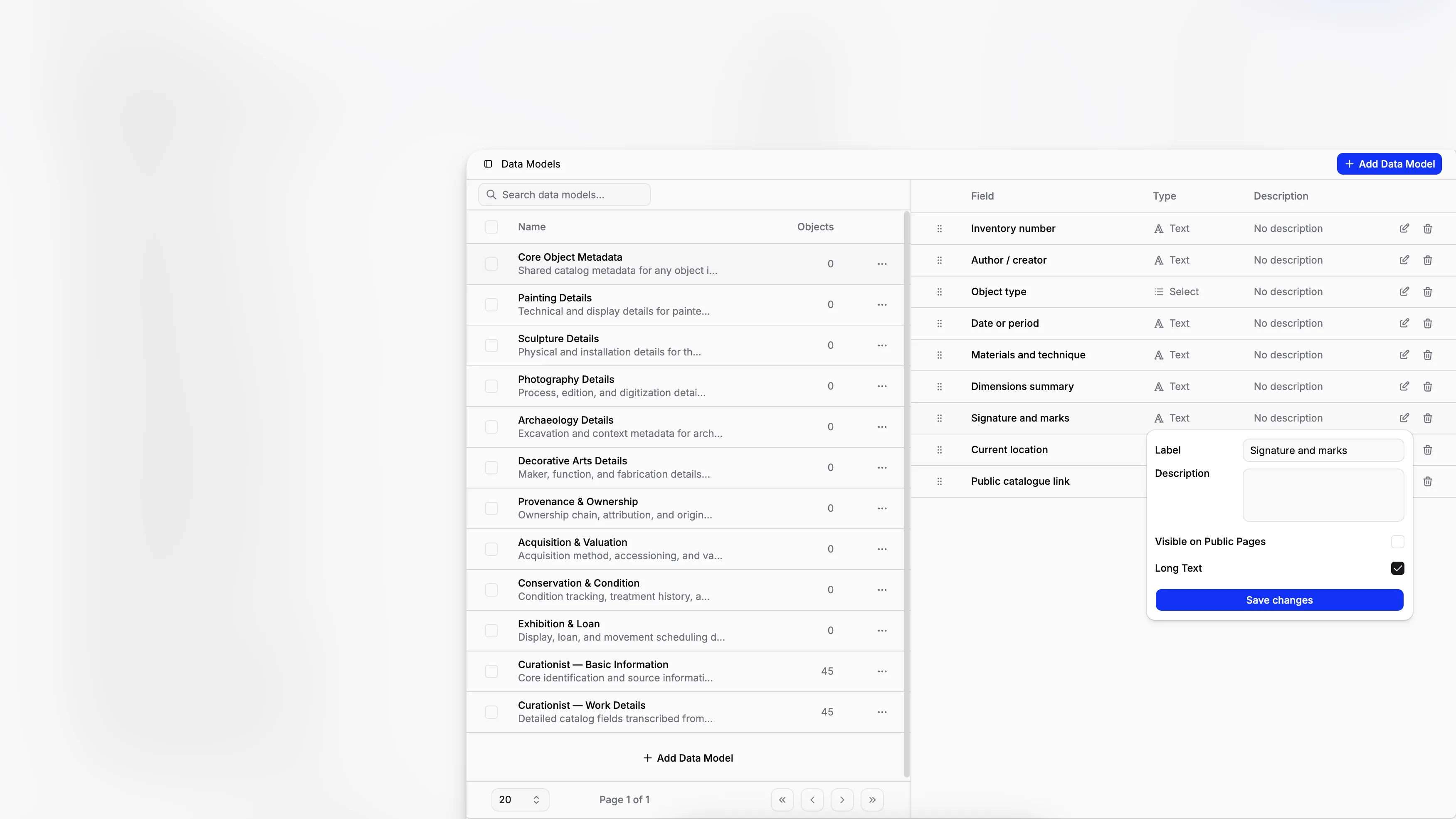
Choosing catalog software in 2026 is less about finding a digital replacement for spreadsheets and more about choosing the system your institution will still trust ten years from now. Museums, archives, and collection-holding organizations need software that can handle object records, internal documentation, digital files, permissions, public publishing, and day-to-day workflows without splitting that work across disconnected tools. Blueputto sits in that category as museum management software built for collections, archives, records, and documentation in one platform.
TL;DR: Good catalog software should do more than store object data. It should help your team standardize records, manage documents, control access, publish selected collection information, and scale over time. Blueputto is worth considering when you want one system for collections, documentation, digital archives, and institutional workflows rather than a patchwork of separate tools.
What does catalog software need to do in 2026?
The term catalog software sounds simple, but for museums it covers a lot of ground. A proper collections database has to support core documentation, repeatable metadata structures, linked records, institutional controls, and public-facing access where appropriate. That expectation lines up with long-established museum documentation practice shaped by SPECTRUM and CIDOC guidance, both of which emphasize consistent procedures and reliable information management.
A museum cataloging system in 2026 should usually help you:
document individual objects and archival materials consistently
organize records into collections, departments, projects, or locations
attach supporting files and internal documents
control who can edit, approve, or view sensitive information
maintain public and private data separately
support long-term growth without forcing a platform change
That last point matters more than many software checklists admit. Collection systems often survive longer than websites, exhibits, and even staffing structures. Blueputto explicitly positions its platform around long-term institutional growth, with support for expanding collections, archives, teams, and documentation workflows in the same environment.
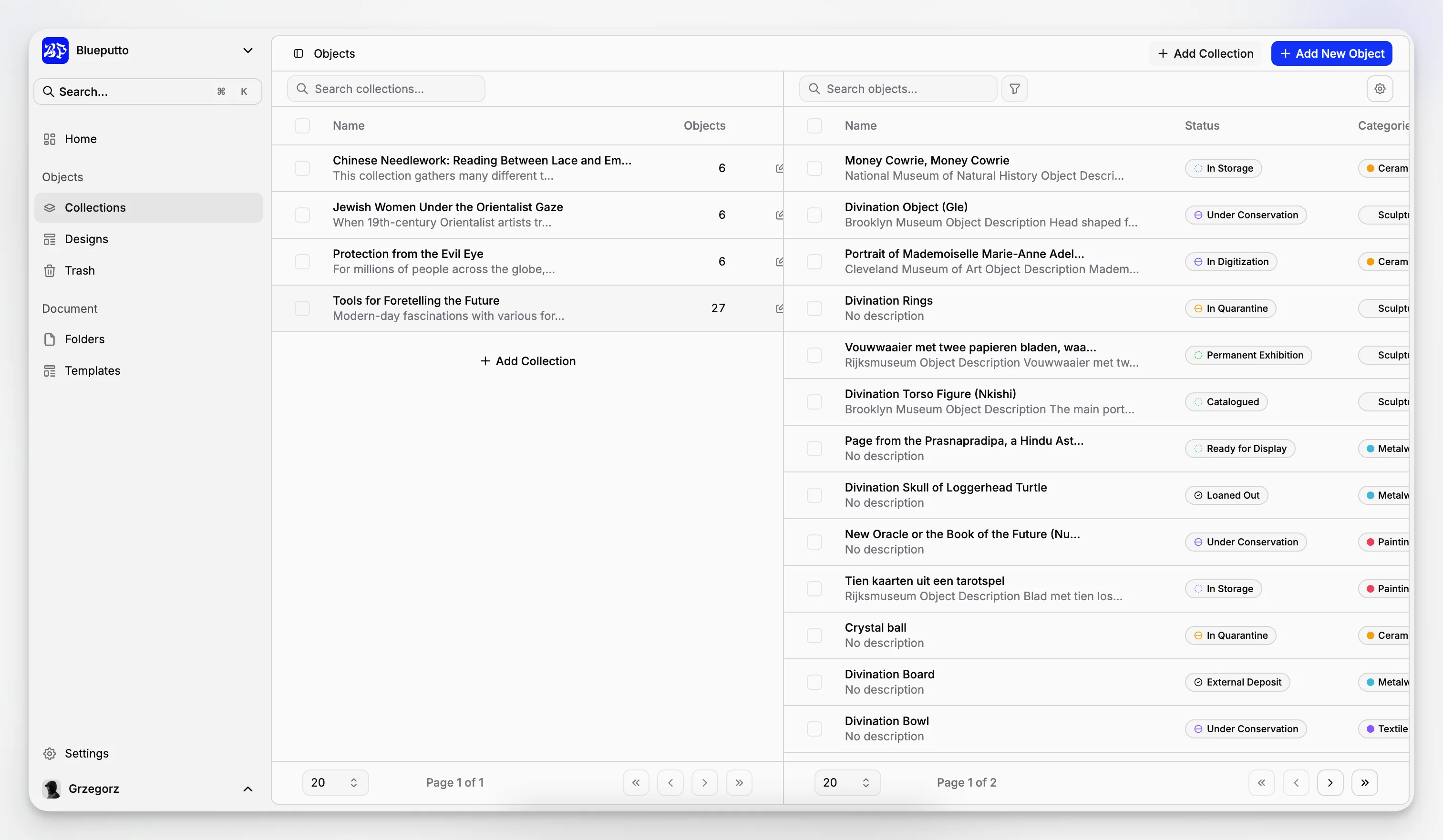
Why are museums replacing older collection cataloging systems?
A lot of institutions are not starting from zero. They are moving away from some combination of spreadsheets, shared drives, paper files, old desktop databases, and rigid legacy collection systems. The problem is rarely that those tools store nothing. The problem is that they store information in pieces.
A registrar might keep accession details in one place. A curator might track interpretation notes elsewhere. Loan paperwork might live in email. Conservation reports may sit in a folder tree no one can search properly. Public-facing collection text may be copied manually into a website CMS. Over time, the catalog becomes fragmented.
This is where modern museum software changes the conversation. Rather than asking whether a system can hold object records, the real question is whether it can become the operational center of collection documentation. Blueputto’s product structure reflects that broader use case. Its public product pages and documentation describe not only objects and collections, but also documents, document templates, data models, team roles, permissions, secure storage, and public visibility controls.
For readers evaluating options, that is an important distinction. A system that only catalogs can still leave your staff dependent on external tools for core work. A system that catalogs and manages the documentation around those records reduces duplication.
What should you evaluate before choosing museum catalog software?
The most useful software comparison is not feature-counting. It is fit-for-workflow analysis. Museums vary widely by scale, staffing, collection type, and public access goals. Still, the evaluation criteria are surprisingly consistent.
Here is a practical framework to use during selection:
Evaluation area | What to look for | Why it matters |
|---|---|---|
Record structure | Reusable fields, controlled inputs, clear record layouts | Prevents inconsistent cataloging across departments |
Collections organization | Ability to group by department, location, project, or exhibition | Mirrors how museums actually manage holdings |
Document management | Attached reports, agreements, forms, and templates | Keeps object records tied to operational paperwork |
Access control | Roles, permissions, and selective visibility | Protects confidential or incomplete data |
Public publishing | Separate internal and public display options | Avoids copying records into another system manually |
Scalability | Reliable performance as records and users grow | Prevents expensive migration later |
Security | Protected infrastructure and controlled access | Supports stewardship of sensitive records |
A platform like Blueputto’s museum management software is most compelling when your needs span multiple rows in that table at once. If you only need a very basic list of objects, almost anything can work. If you need object records, linked documents, permissions, standardized forms, and online collection publishing, the field narrows fast.
How does Blueputto approach museum catalog software?
Blueputto presents itself as museum management software for digital documentation, collection management, secure archives, and institutional workflows. That wording is useful because it describes the system as broader than a static database while remaining within real museum collection work.
The core product areas visible across the site and documentation include:
objects
collections
documents
document templates
data models
categories, labels, and statuses
team roles and permissions
public website visibility controls
That combination gives Blueputto a practical shape. It is not just about entering object metadata. It is about building a coherent record environment where collection items, documentation, and publishing decisions live together.
The Data Models feature is especially relevant for cataloging. Blueputto describes data models as reusable field structures that can be applied to similar objects, with support for text, numbers, dates, yes-or-no choices, single-choice and multiple-choice lists, currency values, and links. It also states that fields can be marked for public visibility, which is useful if your internal record needs to be richer than what appears in a public catalog.
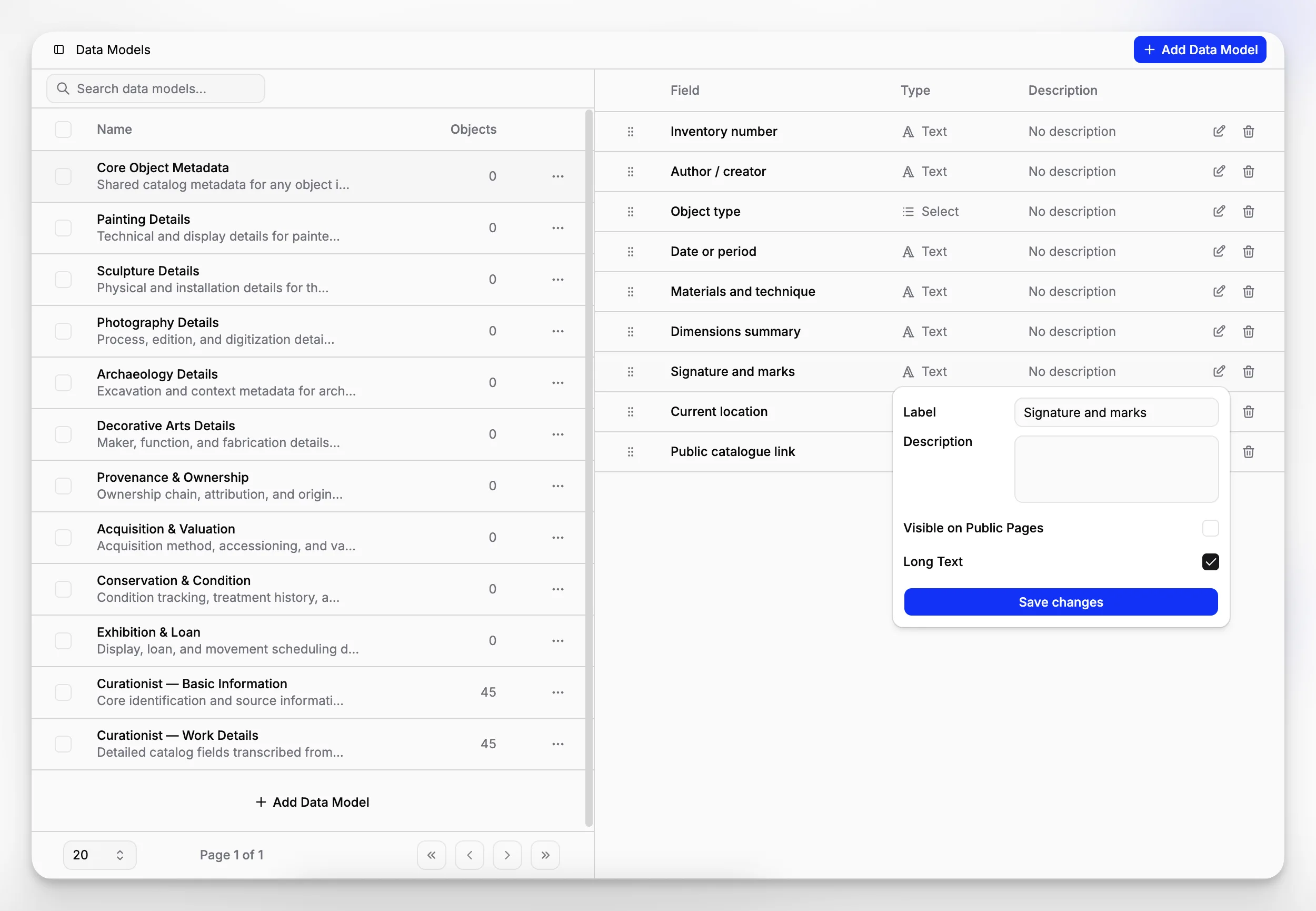
That approach aligns with a basic truth of collections documentation. Most record problems do not begin with missing software. They begin with inconsistent structure.
What does a solid museum cataloging workflow look like?
A cataloging workflow should feel boring in the best possible way. Staff should know where information goes, what fields are required, what is visible publicly, and what supporting documentation belongs with the record. The more variation you allow at the point of entry, the more cleanup you create later.
A sensible workflow in Blueputto can be thought of in five stages:
Define the structure for the type of material you are cataloging.
Create or update the object record with the right model and core fields.
Group the record into the relevant collection, project, or department.
Attach related documentation such as condition reports, loan agreements, acquisition records, or conservation files.
Control visibility and permissions so internal and public uses stay separate.
This sequence tracks well with museum documentation standards. Collections Trust’s introduction to SPECTRUM emphasizes sound minimum documentation procedures, while CIDOC’s information categories guidance reinforces the need for structured object information that supports accountability, use, and long-term understanding.
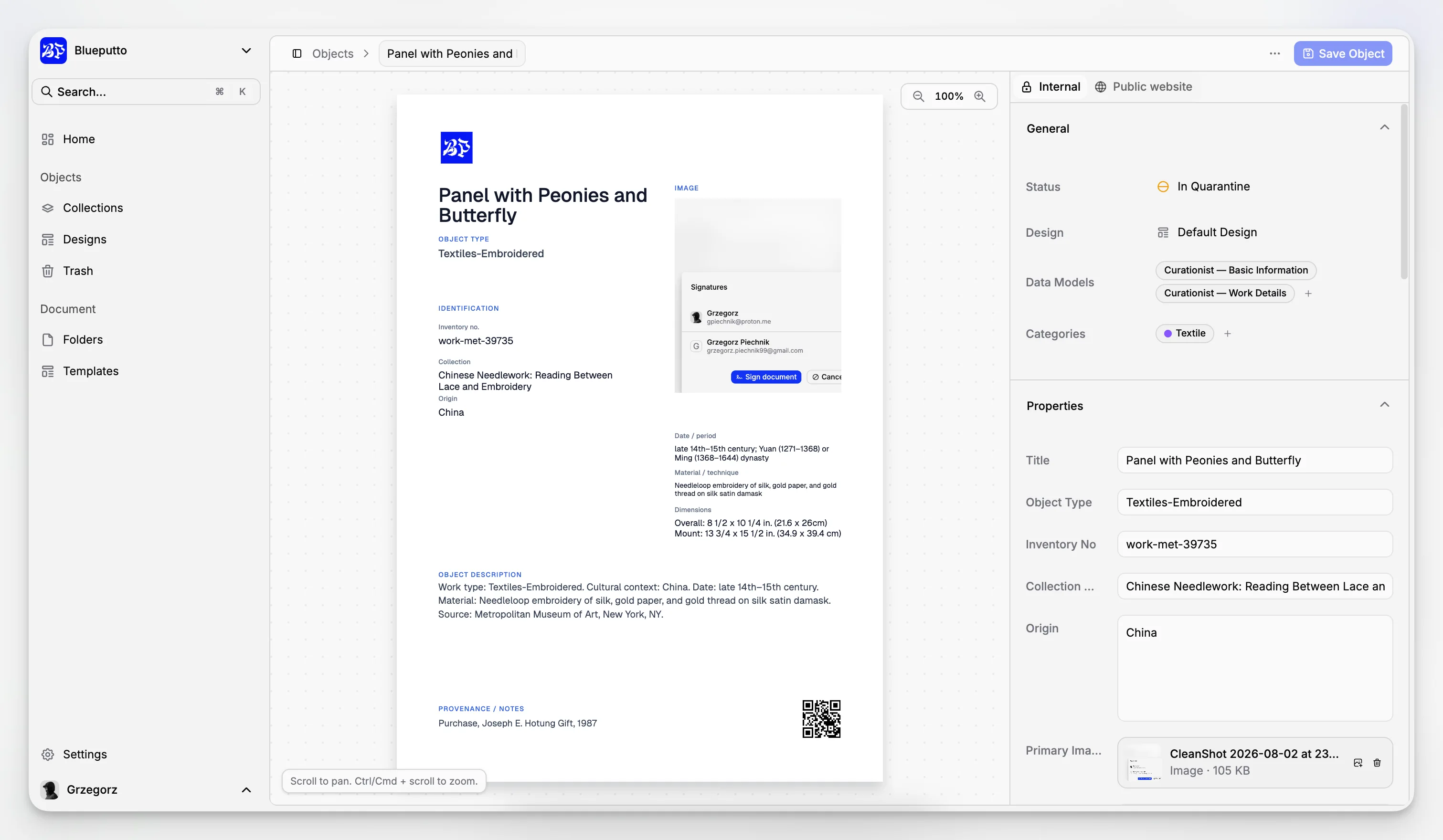
For museums that catalog mixed material, this matters even more. Fine art, social history objects, archives, and institutional records often need different field logic. One monolithic form rarely fits all of them well.
How do reusable data models improve catalog quality?
Catalog software becomes much more valuable when it reduces ambiguity. Blueputto’s model-based approach lets you define fields once and reuse them across similar records, which is exactly the kind of discipline many museums need after years of ad hoc data entry.
That has several operational effects:
It reduces field drift
Without a defined structure, one staff member enters “Creator,” another uses “Artist,” and a third writes the name into a notes field. With reusable models, your institution can decide how a record should be described and then keep using that structure.
It supports different collection types
An ethnographic object, a specimen, a poster, and a loan record do not need identical metadata. Blueputto’s documented model options make it possible to tailor fields to the material rather than forcing every record into a generic template.
It separates public from internal information
Blueputto states that fields can be marked as visible on public pages. That is a meaningful distinction. Museums often need to store valuations, internal notes, donor restrictions, location details, or provisional interpretations that should not be published.
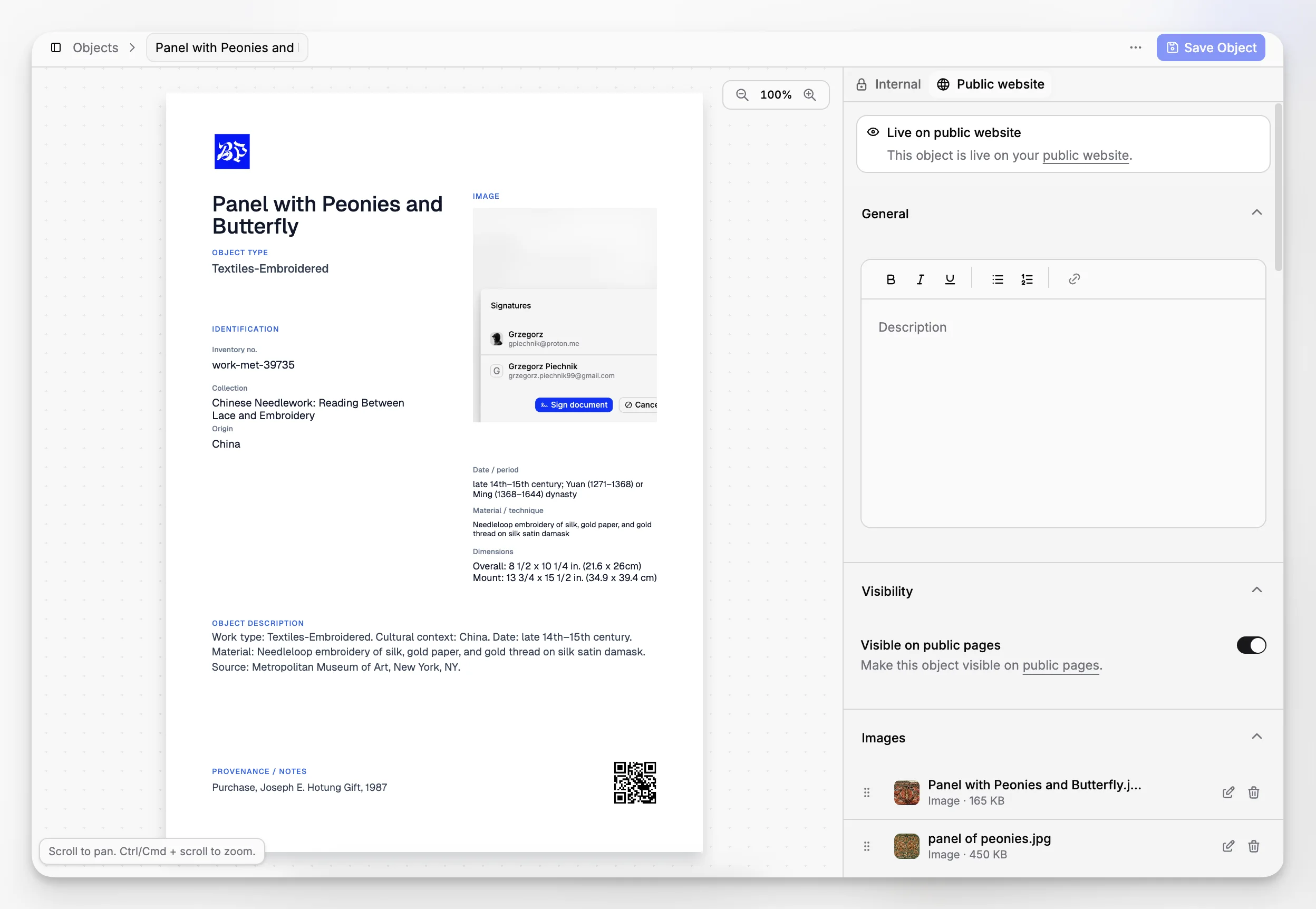
In practice, this kind of structure is what turns software from a record container into a documentation standardizer.
How important is document management in collection software?
It is essential. One of the most common mistakes in software selection is treating documents as an optional add-on rather than part of the collection record ecosystem. Museums do not manage objects through metadata alone. They manage them through forms, reports, agreements, inventories, and correspondence.
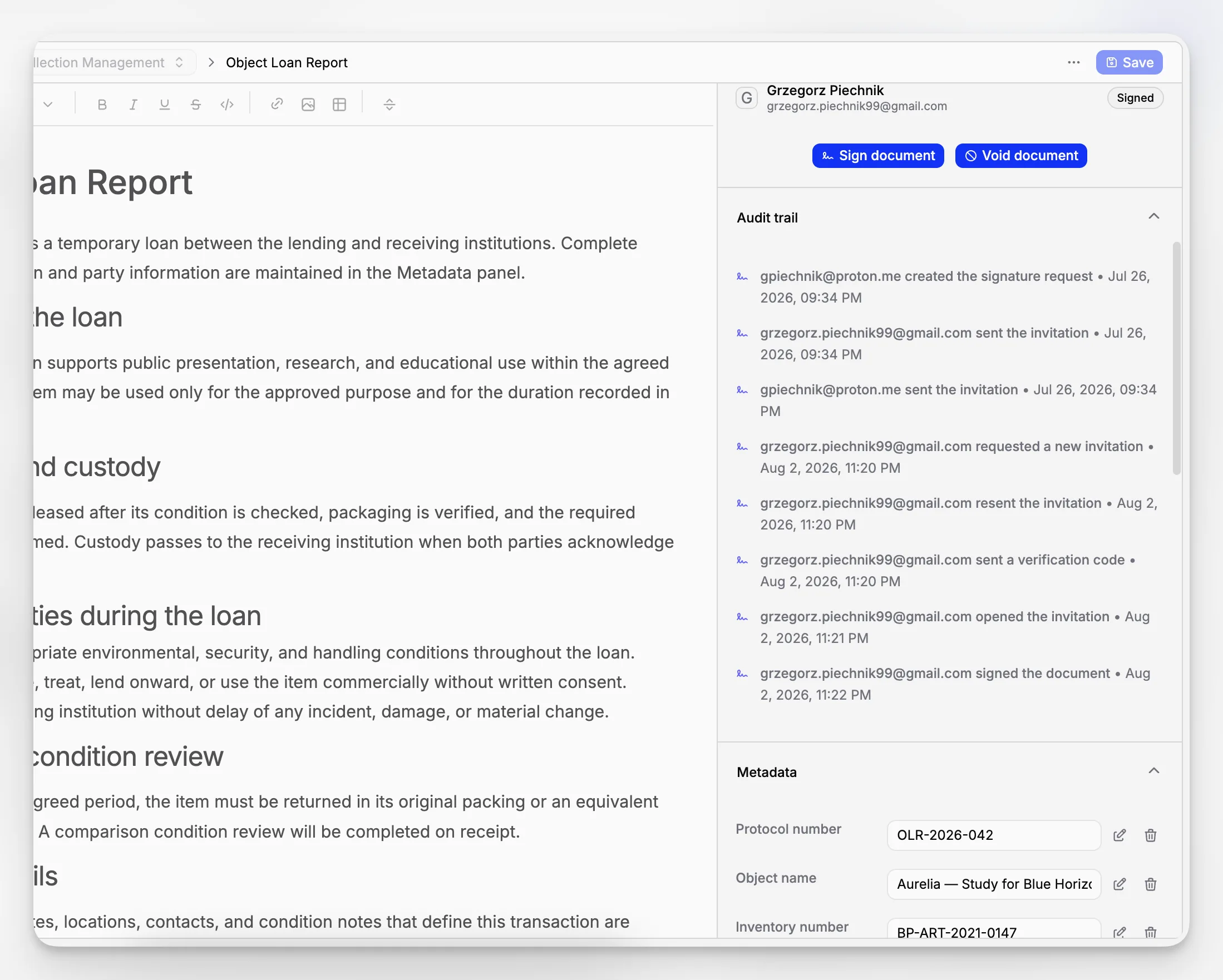
Blueputto gives document handling a first-class place in the platform. Its product pages describe a secure document workspace, reusable templates, encrypted storage, e-signatures, and audit trails. Template examples named on the site include Condition Report, Acquisition Record, Conservation Report, Object Catalog Card, and Loan Agreement.
Those examples are useful because they are not generic office files. They are directly tied to real museum workflows.
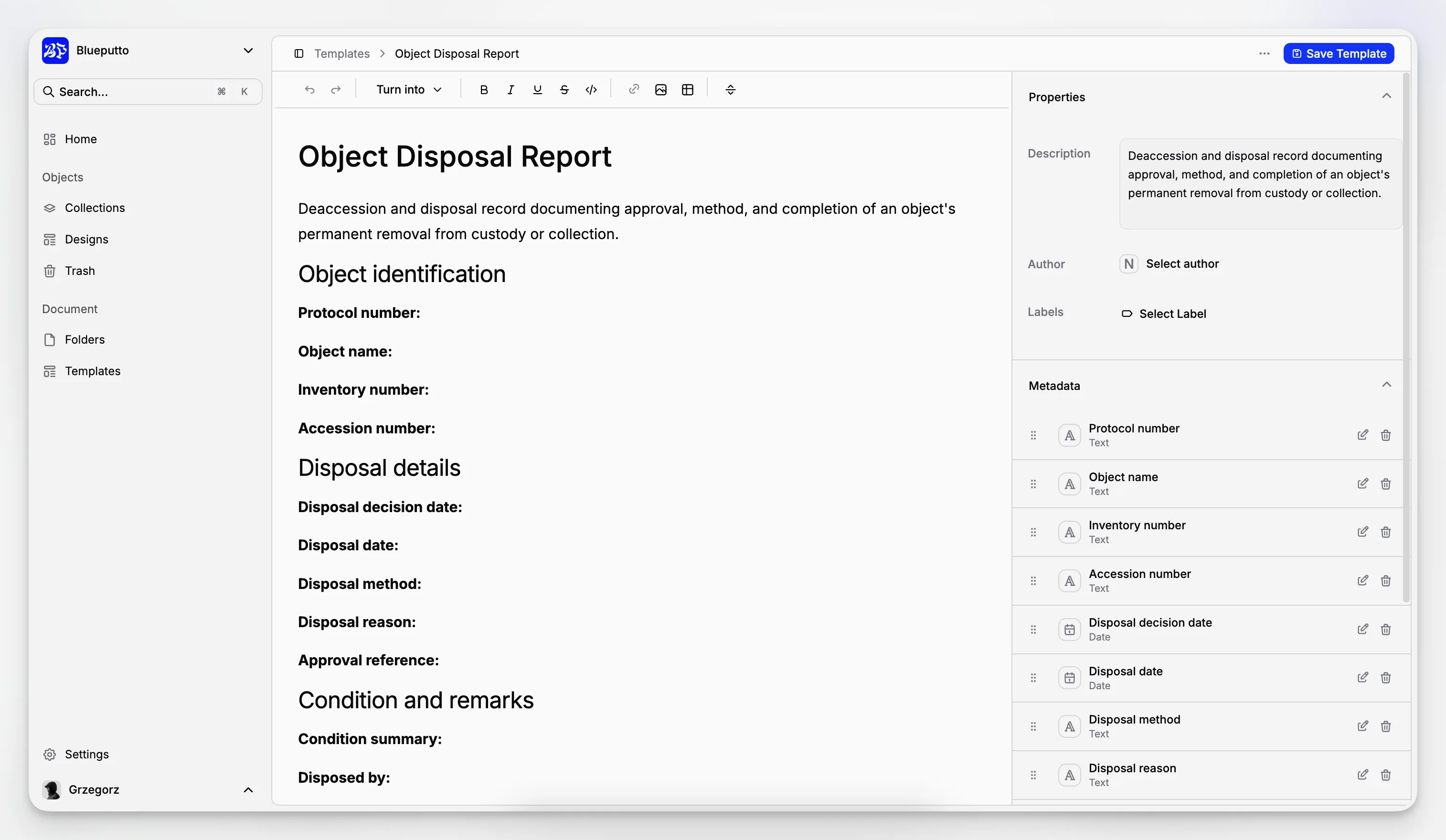
If your institution is deciding between software that stores only object records and software that also supports documents natively, ask a simple question: Where will your team actually do the work? If the answer still includes a dozen folders and manually routed PDFs, your cataloging system is not really central yet.
For broader context, the Canadian Heritage Information Network’s museum standards guidance and the U.S. Department of the Interior cataloging guidance both reinforce the operational importance of thorough documentation around museum objects, not just minimal inventory data.
Can one system handle collections, archives, and records together?
Sometimes yes, but only if the product is designed for it. Many institutions hold more than one type of material: collection objects, archival documentation, administrative records, research files, and born-digital assets. Managing those in separate systems can be justifiable, but it often creates duplicated work and weak cross-referencing.
Blueputto is notable because its own language consistently includes collections, archives, documents, and institutional records. Its scaling documentation says the platform is designed to support growing collections, digital archives, and teams without forcing institutions to rethink their workflow as data grows. That matters for museums building a long-term digital infrastructure rather than solving only this year’s catalog backlog.
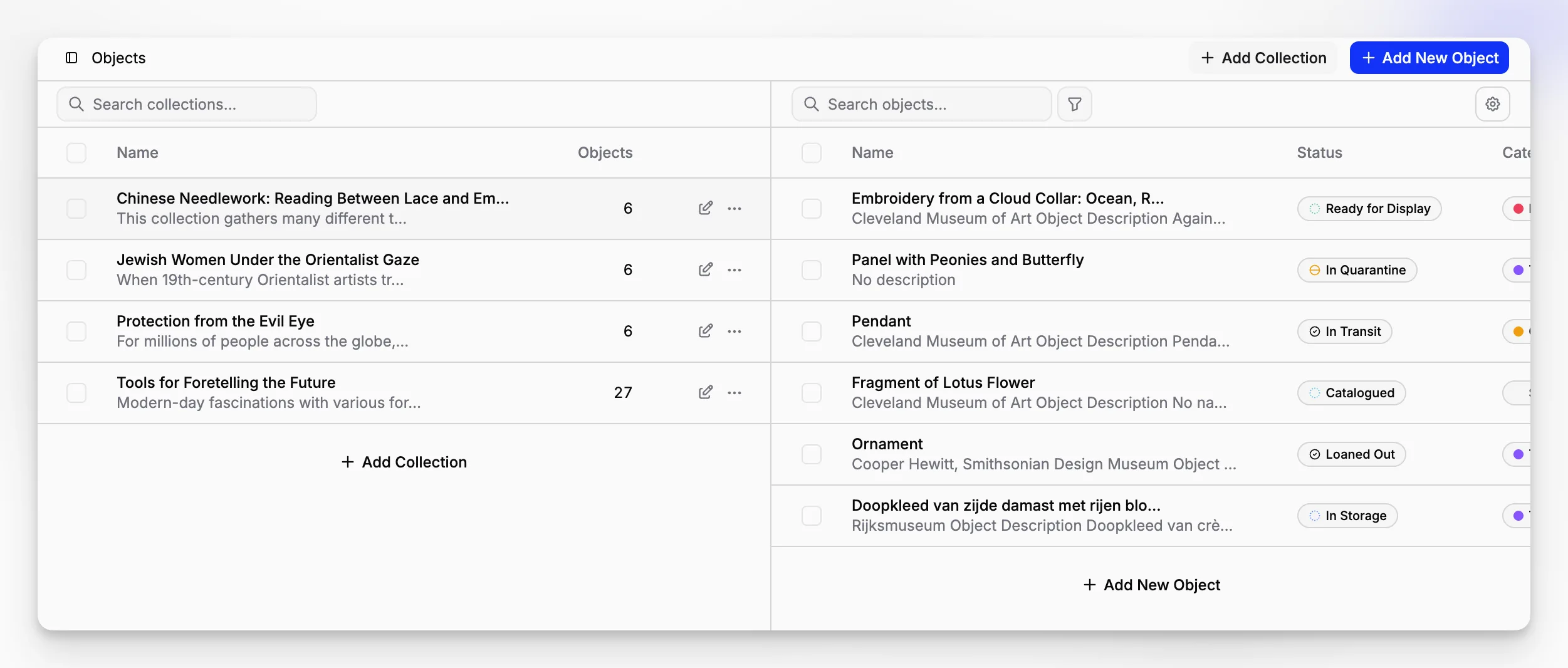
That said, “one system” should not mean “one record structure for everything.” A useful platform handles different kinds of records with enough flexibility to preserve distinctions. For museums evaluating long-term architecture, it can also help to understand concepts like the CIDOC CRM, which was developed to support exchange and integration of heterogeneous cultural heritage information.
Blueputto is not presented on its site as an ontology tool, and it should not be described that way. But institutions that care about interoperability can still benefit from a system that keeps data organized, structured, and internally coherent.
What about permissions, security, and institutional control?
This is where many “easy” catalog tools start to look less attractive. Collection records are rarely simple public data. Museums need to protect location information, donor documentation, legal agreements, conservation details, draft descriptions, and internal operational notes.
Blueputto’s security documentation states that the platform is built around secure infrastructure and role-based access control. It also describes automated protection against malicious traffic and emphasizes secure handling of museum collections, documents, and institutional data. For institutions comparing vendors, that is not a side issue. It is part of whether staff can trust the platform for everyday work.
The product site also describes members, teams, roles, and permissions, which suggests a structure that can map to real museum responsibilities such as registrar, curator, conservator, or administrator.
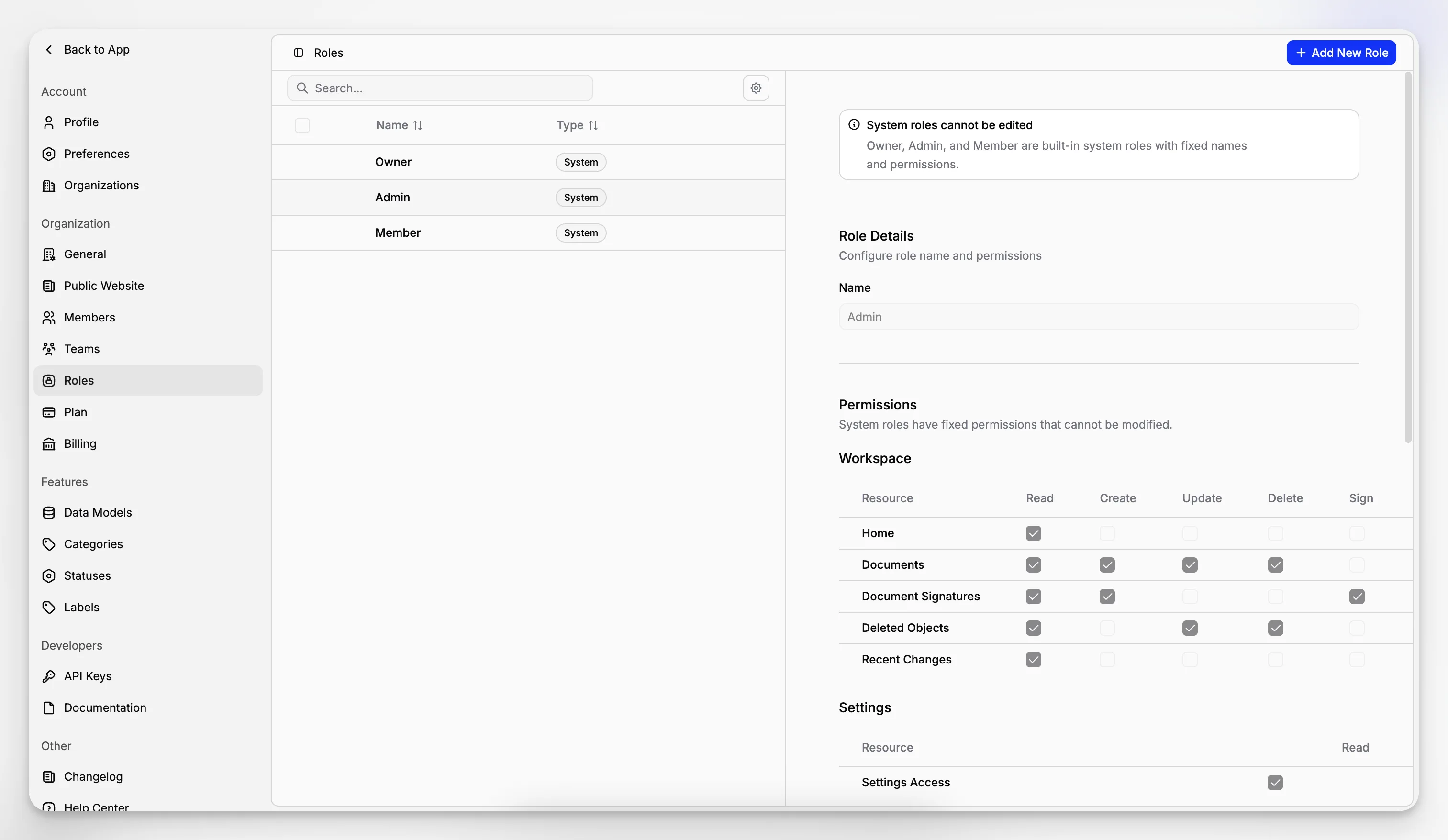
When reviewing options, look for role clarity rather than just “multi-user support.” A good question to ask is whether the software lets your collections manager do what they need without exposing every administrative setting or confidential document to every user.
Blueputto’s security documentation and scaling documentation are useful reading if those institutional concerns are central to your search.
How does public publishing change the value of catalog software?
A modern collection cataloging system is stronger when it can support both internal recordkeeping and selective public access. Blueputto’s main site states that approved collections and object profiles can be published as a searchable online catalog while internal notes and attachments remain private.
That changes the workflow in a practical way. Instead of rebuilding a public collection website by hand from exported data or pasted summaries, you can potentially manage the decision inside the same system that holds the record.
This is one place where Blueputto’s field-level public visibility matters. Public access is not all-or-nothing. Museums often want to share identification, interpretation, maker, date, dimensions, and images while holding back internal movement notes, valuations, legal paperwork, or unfinished scholarship.
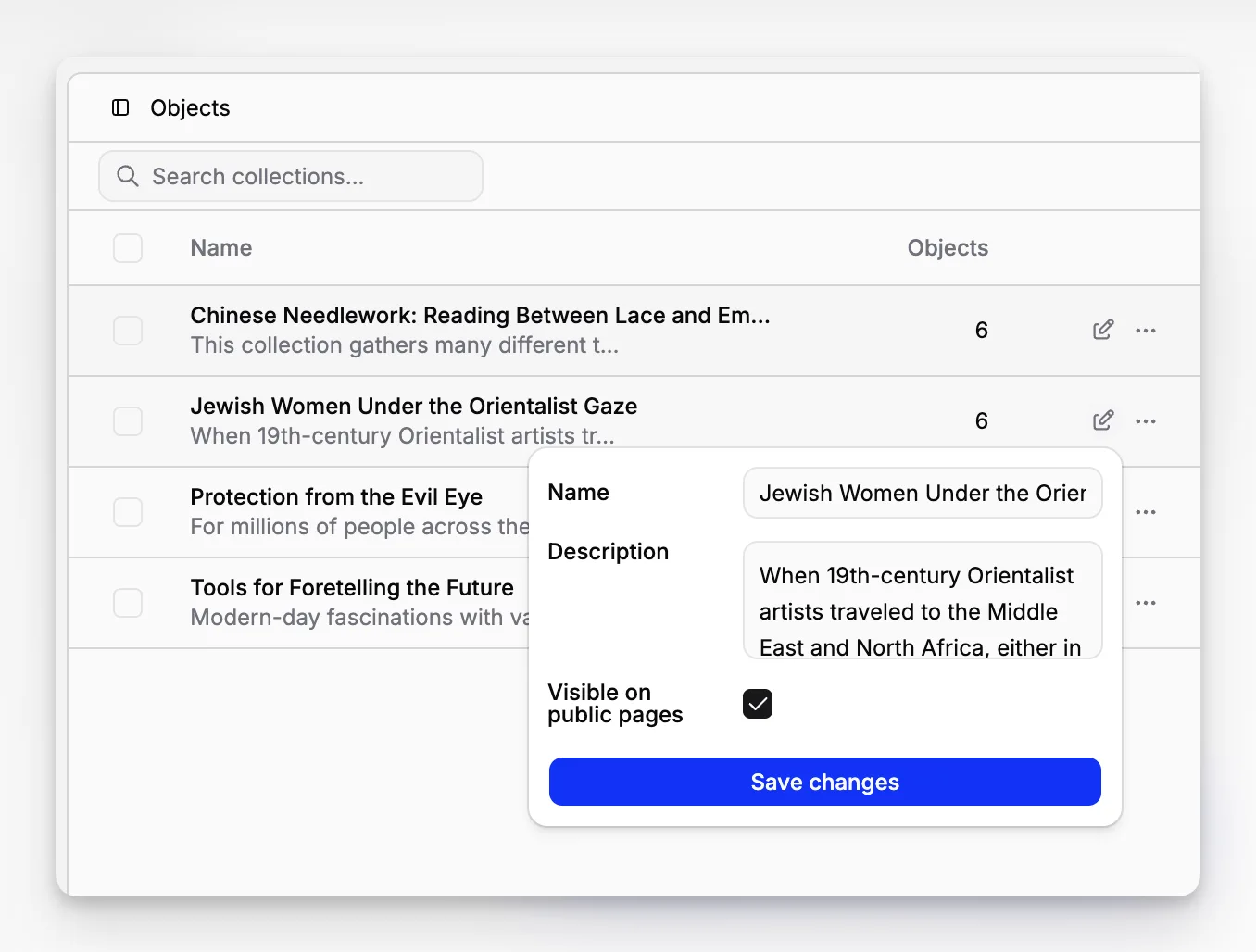
This also reflects wider sector practice. ICOM documentation principles emphasize not only sound documentation but also the importance of enabling access to collection information where appropriate.
What are the tradeoffs and limitations to think about?
No museum software is perfect for every institution, and a realistic selection process should include drawbacks and constraints.
Here are the main tradeoffs to weigh with catalog software generally, including Blueputto:
Setup discipline is required
Flexible systems still need institutional decisions. If you do not agree on field names, status logic, collection structure, or public visibility rules, software alone will not fix catalog inconsistency. Blueputto’s data models help, but they do not replace governance.
Migration effort is real
If your current data lives in legacy databases, spreadsheets, PDFs, and folder trees, moving into a structured system takes planning. The cleaner your target structure, the more migration questions you will uncover.
Feature fit should be tested by use case
Because museums vary so much, you should validate a product against your actual workflows: accessioning, object cataloging, location control, condition reporting, loan documentation, and publication. Blueputto appears strong where collections, documents, permissions, and public visibility intersect, but your team should still map those claims to your exact process.
Avoid overbuying and underbuying
The wrong choice is not only software that is too weak. It can also be software so sprawling that staff avoid using it properly. The best system is one that matches the complexity of your institution without creating unnecessary operational overhead.
What mistakes do museums make when buying catalog software?
The biggest mistakes usually happen before a contract is signed.
Choosing based on demos alone. A polished interface matters, but workflow fit matters more.
Treating documents as separate from cataloging. This nearly guarantees fragmented operations.
Ignoring permissions until late in the process. Access logic should be reviewed early.
Failing to define public versus internal data. This becomes painful when publishing starts.
Migrating bad structure into new software. New software will not automatically clean old data habits.
Thinking only about current size. A system should still make sense when collections, staff, and digital assets expand.
Blueputto’s emphasis on scaling, structured models, and secure roles is relevant precisely because these are common failure points.
Who is Blueputto a good fit for?
Blueputto looks particularly well suited to institutions that need a combined collections documentation and document workflow platform rather than a narrow object list. That can include:
museums building or modernizing a collections database
organizations managing both objects and digital archives
teams that need structured metadata plus reusable forms
institutions that want public collection publishing with private internal notes
growing organizations that expect more users, more records, and more documentation over time
The product may be especially compelling for smaller and mid-sized institutions that want modern structure without assembling several separate systems. It can also make sense for larger organizations evaluating how to reduce fragmentation across departments.
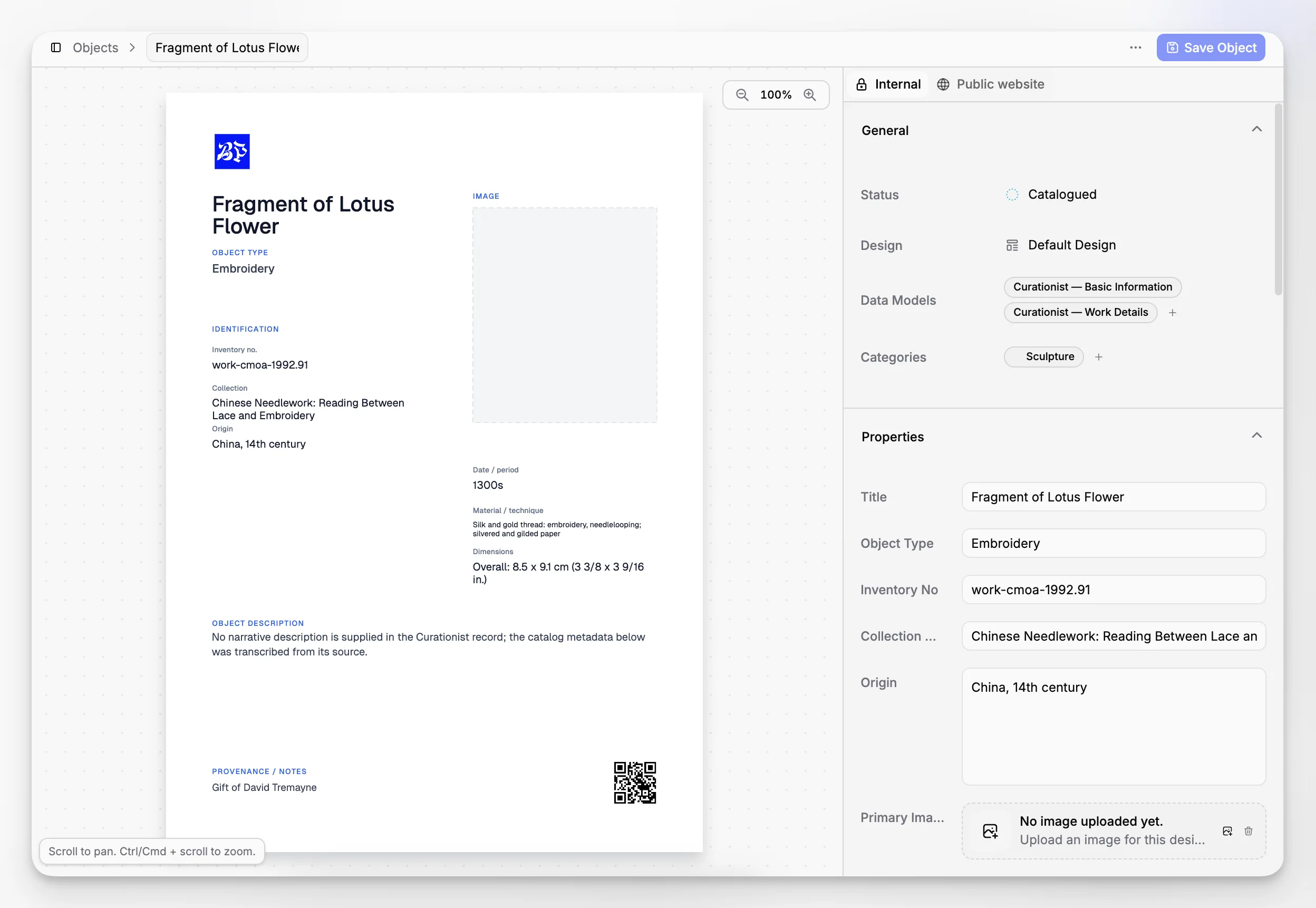
The product’s stated support for object cards, collections organization, custom data models, document templates, e-signatures, and public publishing suggests a platform designed around practical museum operations rather than a single catalog screen.
How should you decide if Blueputto is the right catalog software for your museum?
Start with your workflows, not your wish list. If you evaluate software by isolated features, many tools will appear similar. If you evaluate by real work, differences become obvious.
A useful shortlisting process looks like this:
Identify three to five core workflows your team performs every month.
Write down where information enters the process, where documents are created, and who needs access.
Define which parts of a record are internal and which may be public.
Test whether the software can support that process without workarounds.
Check whether the structure still works if your collection doubles in size.
For Blueputto, the most relevant product areas to explore are the main museum software overview, the data models feature page, and its documentation around security and scaling. If your evaluation centers on standards and documentation quality, it is also worth reading Collections Trust’s SPECTRUM overview, CIDOC standards guidance, and LIDO’s relationship to museum documentation standards.
Why the best catalog software is usually the one that reduces institutional friction
There is a temptation to define catalog software by data depth alone. Depth matters, but what usually determines success is whether the system makes routine institutional work easier, clearer, and safer. Can staff find what they need? Can they trust the structure? Can they attach the right documents? Can they publish what should be public and protect what should stay internal? Can the platform keep up as the institution changes?
That is why Blueputto is best understood not as a simple inventory list, but as museum management software that brings object records, collections, documents, templates, permissions, and publication controls into one coherent environment. For institutions trying to move beyond fragmented recordkeeping, that is the real value proposition.
What makes catalog software different from a basic spreadsheet?
A spreadsheet can list objects, but it does not usually provide structured metadata, linked documents, permissions, public visibility controls, or repeatable workflows. Catalog software is meant to support stewardship, accountability, and long-term access, not just a flat list of items.
Is Blueputto only for object records, or can it manage documents too?
Blueputto is presented as more than an object catalog. Its product pages describe documents, document templates, encrypted storage, e-signatures, audit trails, collections organization, and custom data models alongside object and collection management.
Can Blueputto separate public collection information from internal records?
Yes. Blueputto states that fields can be marked as visible on public pages, and its site describes publishing approved collections and object profiles while keeping internal notes and attachments private. That makes it easier to manage internal and public uses from one system.
Does catalog software need to follow museum standards exactly?
The software itself is not the standard. What matters is whether it supports sound documentation practice. Frameworks such as SPECTRUM and CIDOC help museums define procedures and information categories, and a good system should make those practices easier to apply consistently.
Who should be involved in selecting museum catalog software?
Include the people who actually create, review, and rely on records: registrars, curators, collections managers, archivists, conservators, administrators, and anyone responsible for public collection publishing or institutional documentation. Software decisions fail when only procurement or IT evaluates them.
